The console (for the owner)
On this page
The console is where the owner lives: every page below is a view of the
store, and every button calls the same helper the matching hive command
does. It binds to 127.0.0.1 only; other machines reach it only through a
front you run yourself, with passkey-signed writes (see
Passkey sign-in through a front). Page URLs without a trailing slash,
such as /tasks, redirect to their exported path (/tasks/) without
losing query parameters.
The sidebar lists the pages: Home, For you, Sessions and
Tasks; under Knowledge, Records, Reports, Votes and
Memory; under System, Runs, Machines, Connections,
Automations and Insights; and Settings in the owner's row. Three
of them have no section of their own below. Memory shows the files that
hold what agents remember across runs (Memory).
Connections holds the tools and skills agents can use
(hive mcp,
hive skill). Insights is described
under Home.
Starting the console
hive hub # the console opens at http://127.0.0.1:8765
The first hive hub on a machine makes the store, ~/.hive/hive.sqlite:
started by a person in a terminal, it prints
No store yet: made one at <path> and carries on. Started without a
terminal, as a service does, it makes none: it stops with No store and
names the fix, hive init --store-only. That command makes a store
without starting the console, for a service or a script (hive init run
inside a checkout also makes the store, and registers that checkout as a
project).
On a Mac the same console also comes in a window of its own: see The Mac app.
Everything else happens in the console. On a new machine Home shows the card Set up Hive with three steps, in this order:
- Connect a model provider. The step opens the provider wizard, the
same one as Settings → Harness → Connect GitHub Copilot. For GitHub
Copilot, Sign in with GitHub shows a code, you enter it on github.com,
and every worker on this machine runs with that login from then on
(
hive harness loginis the same flow in a terminal). The account needs a GitHub Copilot seat or plan; the sign-in card says so when it does not, andhive statuscarries the sameharnessline. - Add a project. Add project registers a checkout and queues its
onboarding (
hive init --name my-app --verify 'npm test'in the checkout is the same step from a terminal). - Keep Hive running.
hive hubserves the console only. The runner (the console's word for the daemon) plans jobs and starts agents, and until it runs a task waits in the queue. Keep Hive running previews and installs the daemon and console as user services (launchd / systemd --user) so neither dies with a terminal; Start the runner loads an existing, unloaded service. Finish service setup completes a partial installation when the daemon is managed but the console service is missing or unloaded. Done from the console, thehive hubyou started hands over to the service's at the same address and the page reconnects.hive service installin a terminal installs the same two services but does not hand over: it loads both together, and while ahive hubyou started yourself still holds the address the service's console cannot listen there. The service manager starts it again every 30 seconds, so it takes the address once you stop the one in the terminal.hive daemonin a second terminal runs the runner without installing anything.
The card goes away once a provider is signed in and a project is added. After that Home shows a notice with the same step behind its button: Start runner while no runner runs, Keep Hive running while one runs in a terminal only. The sidebar's foot shows the runner's state. This machine's card on the Machines page has Pause and, after a pause, Start, and the runner's settings are under Settings → This machine. The runner's controls are at the top of that section: Keep Hive running, Start the runner, Finish service setup or Resume, whichever fits. The sidebar's runner line, Start on Machines for a runner that is not running, and Fix it on For you all lead there.
A fresh copy carries the framework's records inside the binary, so nothing has to be imported first (see Share Hive). How the services, self-update, restart drain and stall detection work is described under Services and self-update.
Home
The console speaks plainly - the runner, not the daemon; machines, not executors; private tests, not held-out fixtures - and keeps ids, commands and the store's own terms in tooltips and folded Technical details. The Home page shows a notice when something is wrong (the runner is off, paused or not responding, the model sign-in has expired, part of the page did not load), then Needs you (the first five things that wait for the owner; See all opens the For you page), Working now (the agents at work, six at most; See all runs opens Runs), Projects and This week (changes landed, tasks done and the times the fleet asked you, over the last seven days; See insights opens Insights). On a new machine the Set up Hive card stands where Needs you would (Starting the console).
The Insights page has Over time: what the fleet got done and
what it spent, per day - landings, jobs done, tasks done and agent runs,
each with a sparkline, a per-day rate and the change against the window
before; tokens in and out (and money, when a provider prices its calls);
then a second row, On its own, for the work nobody had to ask for or
approve: pull-request reviews agents finished (and how many they merged
without the owner's click), the findings they posted - bugs, regressions,
evidence - the vulnerabilities fixed (with how many Dependabot alerts
were found), and, beside them, how often the fleet asked the owner
instead; then one chart, folded until you open it, switchable between the
work, the spend and the autonomy. The page's range (7, 30 or 90 days) and
its project picker apply; at 90 days these figures compare 30-day windows.
It reads
GET /api/v1/kpis?days=N[&project=SLUG], one zero-filled row per UTC
day from the harness sessions (the Runs page), the jobs table, the
land.landed / land.merged / task.status / review.* /
security.alerts events and the board's finding and for_owner posts;
days is 1..90 (default 30).
For you
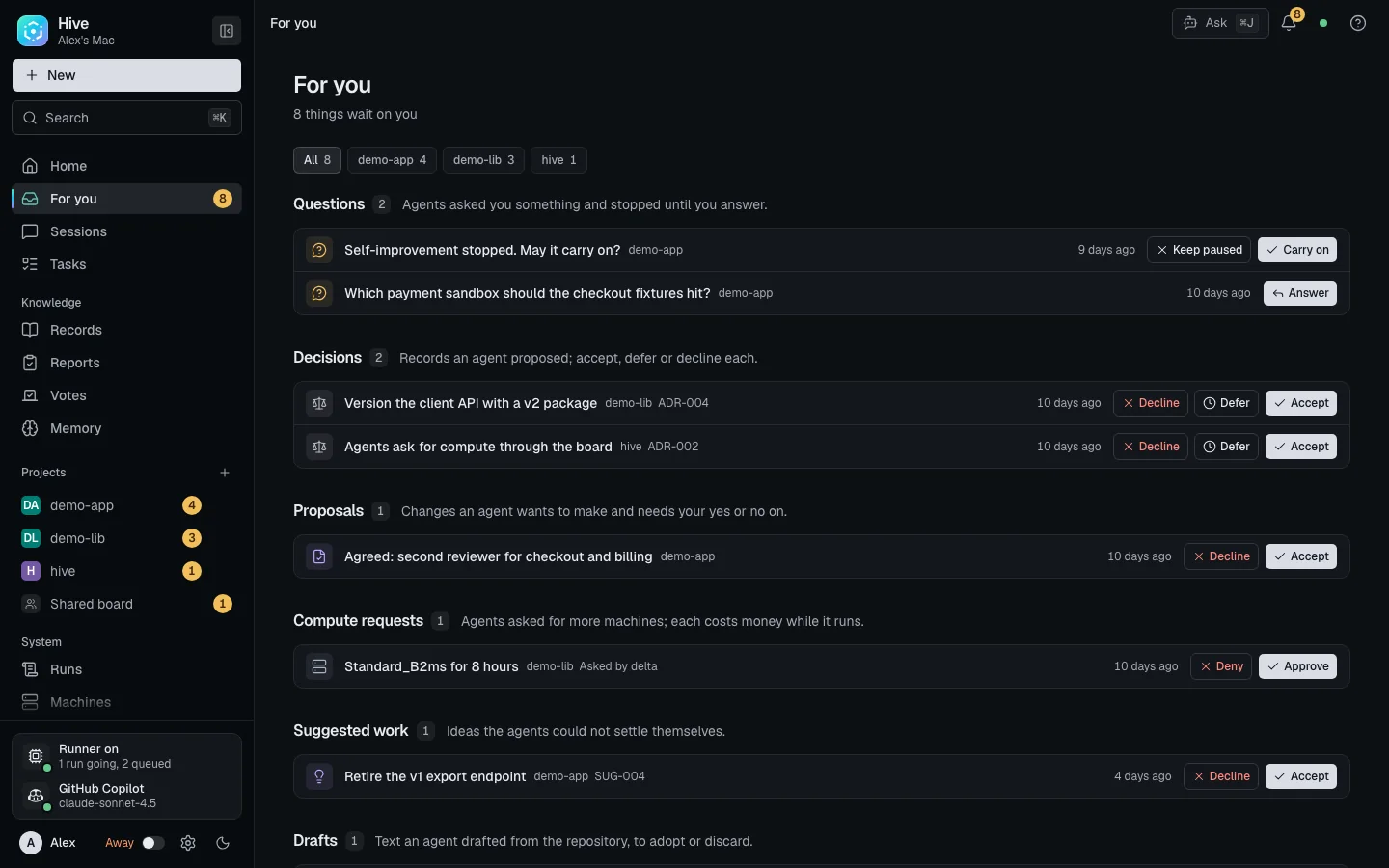
For you is a page of its own in the sidebar, and Home shows its first
five items under Needs you. It holds what waits on the owner's yes, no or
answer, across projects (a task whose lead stopped for you is on Tasks
under Asked you, and a pull request handed to you on Sessions under
Needs your review): proposed decisions (ADRs) to accept, defer or
decline with your own words - the same hive record accept the terminal
runs, recorded as human with the words in the record's history - plus
board proposals, compute requests and the questions only you can answer:
posts an agent marked --for-owner and the evolution loop's "Evolution
stopped; owner review needed" stops. A yes-or-no question shows Yes and
No, and an open one shows a box for your answer
(hive decide <post> yes|no --words '...' from the terminal). Among the
questions the stops come first; a decision
clears the planner's failed-gate and owner-review stops on the daemon's next
tick, and a yes clears an instruction-shaped stop too. The same cards sit on
the project's For you tab, and the Self-improvement tab puts the
buttons next to the planning reason when the loop waits on one.
Notifications can tell you, with a sound, the moment a
new one arrives.
The two private held-out fixtures that open a project's self-improvement loop
need no step of yours: the daemon writes them itself, sealed (one model call
each, no repository, no board, no store) and labelled generated wherever the
counts appear, then grows the set to six and rewrites a generated fixture
once it is a month old, the oldest one per tick. Set evolve.heldout to owner to take the step back: the card
returns and a dialog picks a private folder, creates the set and writes each
fixture (a request plus a built-in effect judge or your own script); the hub
writes the files and never reads them back; the command stays as the terminal
alternative. An owner-written fixture is never overwritten or renewed by generation.
Projects
Add a checkout as a project (the same registration, recipe import and
onboarding job as hive init), typing its path or browsing the machine's
folders with checkouts and registered projects marked; rename one from the
project page's menu (POST /api/v1/projects/<slug>/rename with {"name": ...} - the display name the console shows, while the slug in every link, job
and post stays); point one at the folder it now lives in (Change folder… in
the same menu, or the Point to its folder button a project Missing on
disk shows in its place - a folder moved, a disk swapped, a clone made again;
POST /api/v1/projects/<slug>/move with {"path": ..., "force"?: bool}, the
same as hive move SLUG PATH [--force]: the slug, tasks, posts and history
stay, a folder that is no checkout or another project's is refused, and a
checkout of a different repository is refused until Use this folder anyway,
which also adopts its remote); remove one after a preview of what deactivates,
and restore a removed one from the picker. A checkout the runner made
itself - a worker clone under HIVE_HOME/work, a fleet clone or measurement
root under HIVE_HOME/fleet, a worktree under HIVE_HOME/worktrees - is
refused: those come and go with jobs, and a project
is the checkout they are cloned from. Adding a path that is already a project
refreshes it instead of duplicating it: a name given with it (hive init PATH --name N from a terminal) renames the project, while its slug - what posts,
jobs and records point at - stays. The brain is never removable from the
console.
Each project card shows its self-improvement state - constitution revision (and
whether it is still the seeded text), enabled fixtures, baseline (measured by
the daemon, "measuring" while its job runs), the level the loop may reach - and
the project page lists its fixtures. Goal, on a project's Overview,
gives every agent the same direction. Edit sets your outcome; without
one, Hive supplies a project-derived default. Until you set one,
Home's Projects list says so on that project's row - Runs on a
generated goal - with Set goal, a link straight to that panel, since
the lead plans, votes and researches toward whatever goal is there; the row
says so only while nothing waits for you there and nothing is wrong.
hive goal set --project my-app --text '...' sets it from a terminal.
Tasks
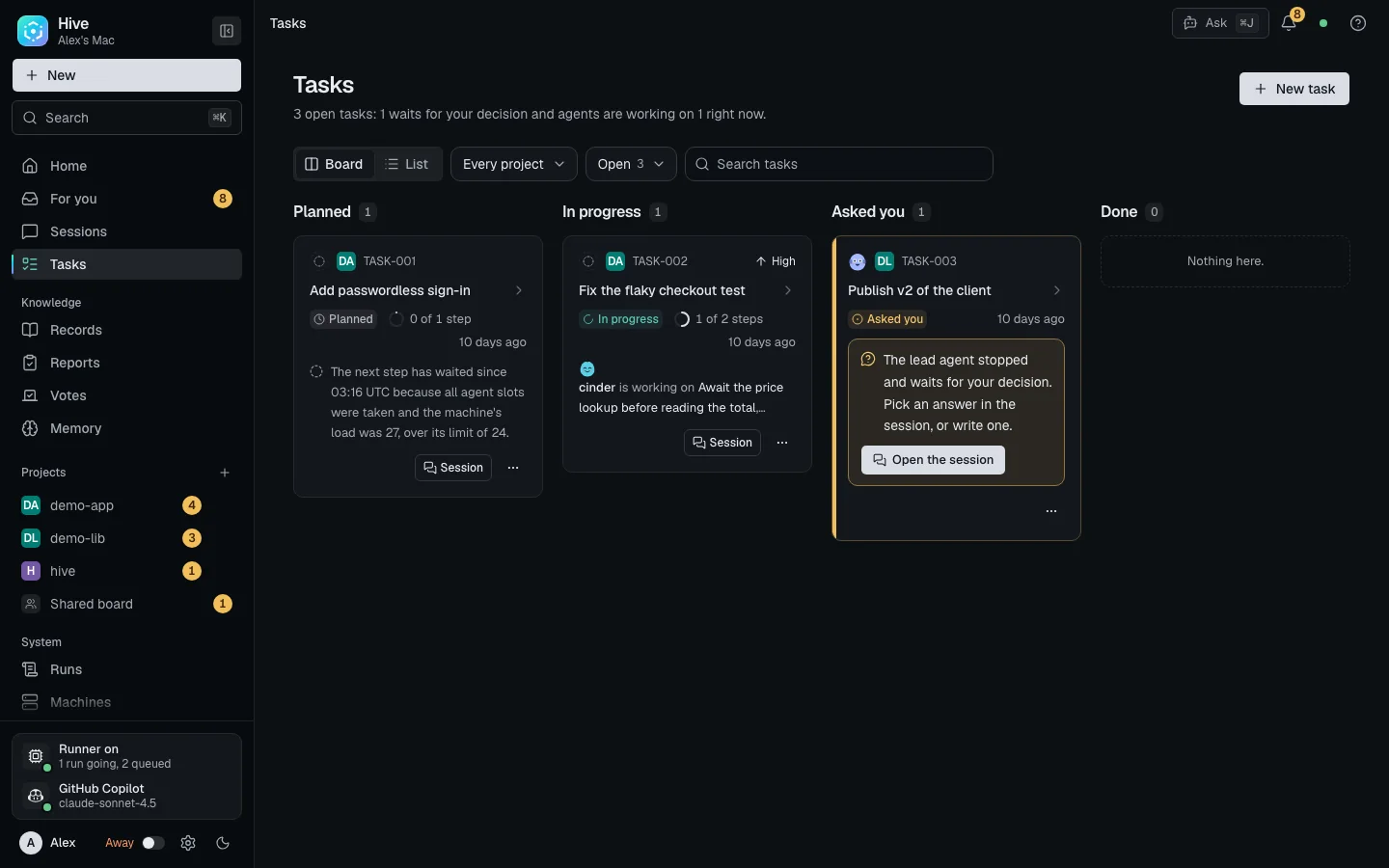
Write a brief, set a priority, amend or cancel it later; each revision is kept.
The project's lead agent starts on it at once - your write wakes the daemon
and it plans right away, not at the next daemon.pass_seconds - turns it
into jobs at the task's priority (urgent runs first) and reports back on the
task thread. A task
is a group of conversations - yours with the lead, and one agent session per
job the lead cut - and the Sessions page lists it that way, under Tasks
above the single conversations (see Sessions); the Sessions
composer gives a task too (The project's team), so one box starts either. A brief can run long: a write
takes up to 1 MB of JSON (before, 16 KB, and a pasted brief past it failed with
JSON body must be 1..16384 bytes and no word in the page).
Your work leases before the fleet's own: a lead run, an answer, or a job
planned from a task (task:TASK-NNN, or task:TASK-NNN:<label> when one task
needs several jobs) goes to the next free worker ahead of improve jobs and
ballots whatever project waited longest, and while the machine is saturated one
local slot stays open to that work alone. Write on the task thread again while
its jobs are queued and the daemon raises them to priority 80 (task.nudged in
the timeline), once per message - a nudge moves the work, not only the lead.
Nothing waits on you: a task the lead parked comes back to it on a doubling
schedule (15 min for urgent, then 30, 60, ...) until the blocker is gone, and
so does one the lead itself sent to review (held in the daemon's line) while
you have not answered - the lead re-checks what it was waiting for (a record
merged, a branch landed) and puts the task back in progress when it is gone,
so a review never sits on something that happened without you; a
failed job goes back to the lead to re-plan, a sitting the lead lost to an
outage (a provider error, a timeout, a dead run - anything the daemon would
retry for a worker) brings its tasks back after five minutes, then 15, 45...
while the outage lasts (lead-failed in the daemon's line). A task whose
jobs are all done becomes one pull request on the project's upstream
(Delivery); the reviewer reads it and merges it, or hands it to
you under Needs your review with its findings and a Merge button
(The reviewer); and merging closes the task (land.merged),
while closing the pull request unmerged sends it back to its lead with the
pull request's words. The pull request is where you look at the work - the
diff, the reviewer's findings, the pipeline's verdict - in place of the
the work landed. Have a look - is it what you wanted? question the local
landing asked.
A task done in two or more jobs is reviewed as a whole: each slice passed
its own tests, nobody yet walked the path across them, and that is where split
work breaks (six slices of a picture-attachment task once landed with the
picture never reaching the model). The task's pull request is the jobs'
branches merged together on the default branch, so the reviewer reads the
whole change against your brief, runs the project's check on it, and asks for
changes where a slice does not meet the next - a task job of the same task,
whose branch joins the pull request when it finishes. Leads plan vertically for
the same reason: the first job makes the thinnest end-to-end path work, the
next ones widen it.
Each job is a sub-session of the task, and it reports back to the task's
conversation the moment it ends: the daemon writes one message in the worker's
name (Done with the step "Composer UI". … with the worker's summary, or
Stopped on the step … with why) marked with the job, so you read what each
step found as it comes instead of hours later in the lead's summary. The chat
shows a report nested under the conversation with the step's live state
(Waiting for merge, Merged, Failed, Queued again) and a See the
run
link; a report is news, not the lead's answer, so the delivery line under your
message stands and the lead's choices stay live. The lead reads the reports in
its next brief under Your workers reported back, never as your words, and a
report alone wakes nobody: the daemon opens the pull request once every step
is done, the reviewer reads it, and a failed step reaches the lead the way it
always did. (hive task show and hive msg list tag a report with its job.)
review means the lead could not finish without you - the conversation says
why - and the lead's brief tells it that your answer, however short (use your judgement, do not ask me), is final: it decides, writes the decision in one
message and plans; a task that mixes a reserved decision with ordinary work
gets its Tier 0/1 parts planned now and one doc job drafting the decision
record, never a second round of questions. A review is a decision, not a form:
the message that stops a task carries choices (Try again another way,
Good enough, close it, Change what I asked) shown as buttons under it in
the chat, so you tap one or write your own words; either way your message
returns the task to in progress, the only backward move a task can make, and
the lead takes it from there (a tapped close posts POST /api/v1/tasks/<id>/status {status, words?}, the words reaching the chat
first so the lead reads why). Agents offer choices on their own messages with
hive task reply TASK-012 --choice "Keep both" --choice "Drop the old one=done" (up to six; =done closes the task with that label as your words,
=amend opens the brief, plain labels reply). A lead that stops a task with
no answers to pick gets them from the daemon on the next tick, in its own
name and with its own reason (Use your judgement, Good enough, close it,
Change what I asked), so no review is a blank you stare at. The daemon writes the stop to
the chat itself - I stopped TASK-012 (...): three jobs failed ... - and the
delivery too, so nothing shows waits for your decision unless a message of
yours would change what happens next: a review whose jobs are still running or
whose pull request is still open goes back to in progress on the next tick,
and one you have answered stays with the lead until it replies - Not what I
meant tells the lead to ask in one message what fell short, or to plan the fix
when your words already say.
Under your latest message in a task's chat one line says where it stands, so
you never type into silence: Sent when nobody has it, Sent · ember reads it
next while the lead's sitting waits for a slot (or is busy in another one),
the typing dots with ember is reading it… while its sitting runs, Seen by
ember once a sitting that had it in its brief finished, and after two minutes
with no pick-up Sent · nobody has picked it up yet in amber - the daemon's
own doing, not the lead's: the project's lead sitting (lead_work on GET /api/v1/tasks/<id> and GET /api/v1/messages?project=) and the message's read
marks are what it reads. An answer under your message replaces the line.
Opening a task - from the Tasks page, the palette, Home, an agent's, run's or
delivery's task link, or the board chat - opens its conversation on the
Sessions page (see Sessions below), and that conversation is the
whole story of the
task, not just the words: one feed, in order, of everything that happened to
it - your brief and messages (the lead's answers as buttons under its latest
word), the jobs the lead cut, each run as a chapter under the agent who did it
with the commands it ran (✓/✗ and how long), the files it edited, its plans and
what it said between tools, the quiet stretches folded into one line (read ×3
· grep), the delivery and the status changes, and the posts agents wrote about
it on the board. A running chapter shows the typing dots and its last step's
age and the feed follows the work live, so while an agent is at a step you
watch it think and type; a finished one folds to a line (cinder worked 11
minutes: 12 commands, 4 files changed — finished) you open when you want it.
Full run on a chapter opens the whole harness session; the feed keeps the
newest 400 lines and Show everything fetches the rest (GET /api/v1/tasks/<id>/activity?limit=0).
Beside the conversation sit the steps, the brief, a History of its versions
once you changed it, and the facts. Under the title a delivery line says where
the task's code is once its jobs are done: PR #n open, waiting for review
once the daemon opened the pull request, PR #n is being reviewed while the
review job runs, then Needs your review: PR #n — <reasons>. <the review>
with a Merge button (it records review.ask; the daemon's next pass
merges the pull request on GitHub as you), Changes requested on PR #n:
<note>. Follow-up <job> is queued., The review of PR #n failed: <why> (the
Merge button again), Merging PR #n… and Merged; a branch the pass could
not deliver shows its land.pr-held note
(delivery on GET /api/v1/tasks/<id>; Delivery, The
reviewer). Once the pull request is open, delivery.pipeline
carries the daemon's verdict on the runs its push set off - watching,
passed, failed (with pipeline_job, the fix job it queued), none or
gave-up (see pipeline.watch).
Suggested work
The agents propose the next task; another agent judges it before it reaches you. The Work tab's Suggested next panel lists each suggestion with who made it and where its review stands; a verdict the reviewer would not make for you (Your call) joins For you with Accept and Decline, Accept making the task on the spot. You can suggest work yourself from the same panel - an agent reviews it the same way - and withdraw a suggestion of yours while it waits. See Suggested work.
Sessions
A session with an agent that works while you watch, the way the Copilot
and Claude Code apps do, so the hub is the one place you ask for work. Type
what you want and press Start: the hub runs the agent itself (the same harness
jobs use, with the model the project runs on) and the page shows the turn in
the order it happens, the way the Copilot app does: the words the agent writes
as plain text, then the tools it runs as one flat line each - the >_ icon,
what the agent says the command does (the description it gives the bash
tool, kept with the step as its title), the command itself dimmed after it, a
Failed mark only when it went wrong; the request and the output fold open
under the line - with Thought for 3s rows between them for the time the
model took, then more words, and last the text still being written. No cards,
no avatars; what you wrote sits on the right in a quiet bubble, the time shows
on hover, and a run longer than eight lines folds its earlier rows under one.
The checklist the agent keeps with its plan tool (to do, doing, done) shows
as a card in the transcript where it changed and, for the current plan, as the
Plan tab of the canvas; the sub-tasks it hands to a helper (the subagent
tool, on by default) show one level in, with the helper's report.
The agent keeps going turn after turn; when it needs you it stops and one card appears - a question with its choices stacked full width, or a tool it wants to run - and the session says Asked you in the list and the tab title counts what waits (the transcript does not echo the question above the card; the steps fold while it waits). Answer in a word or a sentence, Allow once, Always allow or Deny with a reason the agent reads; nothing else blocks.
Auto (on by default) lets tools run without asking, as the daemon's own jobs do; switch it off for a session you want to watch step by step, and flipping it on while an approval waits grants it.
Lockdown (off by default) is the switch beside it. In lockdown the harness withdraws web search, page fetching and the MCP tools and refuses a command that reaches outside the machine; on macOS each command also runs in the operating system's sandbox. Switched on in a running session, it applies from the next turn. Security notes says what is enforced where.
A message typed while a turn runs goes one of two ways. Enter steers the running turn (Steer the running turn): the agent reads the message before its next step, and it is in the transcript at once, marked Steered. ⌘/Ctrl+Enter queues it (Queue message): it waits in line and starts a turn of its own once this one ends - shown as Queued under the transcript until the agent picks it up, and written into it only then. Stop ends the turn now, and a message still in line stays in the transcript with a note that it never reached the agent.
The controls sit in one place, under the message box the way the Copilot app
keeps them: the Model picker (also on the start form) chooses the model
from the ones the harness lists (the provider's default when you leave it) and
changing it mid-session takes effect on the next turn, which starts a
fresh session with the transcript carried over; the Effort picker beside it
(also on the start form) asks the model for a reasoning effort - minimal to
xhigh, Model default to send nothing - and leaves the harness.reasoning
setting in charge when you leave it, with the same next-turn restart; Auto
and Stop sit beside them.
A session has an end: the agent calls its finish tool with a one-line
summary when the request is done (the brief tells it to, and to give its
closing reply after), or you press Finish (which stops a running turn), and
the session is marked Finished with the summary as its note; your next
message reopens it, so nothing is lost.
The list is one list, grouped by state - Needs your review (a pull request
the reviewer handed to you, with its reasons and the Merge button; these
stay at the very top), Working (running or waiting on you), In review
(nobody at it, and its work is on its way through a pull request: a task's
once its jobs are done, a session's once its hive/chat-<id> branch
holds commits the default branch lacks - before the pull request is opened,
while it is open or being reviewed, while changes are made and while a merge
you asked for runs; the row moves to Finished or Open the moment the pull
request is merged or closed), Open (idle
between turns), Finished (the latest eight, Show all for the rest) and
Archived when shown (put away is your word, so an archived session
stays there whatever its branch holds) - so the ones that need you stay on
top, ordered by what moved last. Waiting to land and Reviewing were the
groups of the local landing; nothing waits to land now. A task the project's
team works on is a row like any session - its title, a team mark after
it, its state in the list's words (Working while a step's agent runs, Asked you when the lead
stopped for you - counted in the tab title with the sessions that
wait - Waiting for its pull request once its steps are done, then the
pull request's own word: Pull request open, In review, Needs your
review when the reviewer handed it to you, Changes requested, Merging,
Review failed - Planned, Done, Cancelled) - with
the steps the lead cut as lines under it the way sub-sessions sit under
their parent: the agent on each (a dashed circle until one takes it), its
state (Waiting, Starting, Working; a done step whose branch is not
merged yet reads where the task's pull request stands - Waiting for its pull
request, Pull request open, In review, Needs your review, Changes
requested, Merging, Review failed; then Done, Failed, Blocked) and
when it last moved; a finished task folds its steps
(N steps · show).
A session's title follows the session: it starts as the first line you wrote, and after each reply the agent asks its model for a short name of what the talk is about now and renames the row (the list and the tab title pick it up on the next poll). Rename one yourself and it is yours - the agent leaves it alone from then on.
Opening a task, or a step without an agent yet, opens the task in place the way
a session opens (?task=TASK-NNN in the address, so a link lands on it):
a header with its state, project and lead, Finish and Cancel beside it
(the title opens the brief for editing); under it the task's whole feed as the
session (see Tasks above) - what you asked on the right, the lead's
replies on the left with any choices it offers as buttons, a step agent's
report back framed with where its work stands, and each run as a live chapter
under the agent doing it, its commands and words arriving as it works - and a
box to answer or steer, which the lead reads on its next turn (a finished task
says so and takes no more); the canvas beside it (below, the same one a
session has) opens with the Steps - who is on each, how far they are,
the one whose run is on the canvas marked - and What you asked with the
task's history and facts, and while a step's agent works, that run's plan,
terminal, the files it edits and the pages it reads open there by themselves,
the canvas following whichever step is working now. A step's row opens its run
on the Harness page. Finished tasks stay listed a week, all of them with Show
archived.
A session can hold sub-sessions of its own: whole
sessions - their own transcript, session and page, opened and steered like
any other - that its agent starts with the chat tool (start with a title
and a brief) for a part of the work worth a page of its own - a long check, a
second opinion, a piece that should keep going while it answers you - or that
you start from the Sub-sessions panel on its page (Start one: a
title and the brief). The agent's brief tells it to fan work out rather than do
all of it in one thread: a request with several parts, or with one part that
takes a while, is split - the agent keeps the decision, the join and the answer
to you, and hands the rest to a helper inside its turn (the subagent tool,
for a bounded lookup or a long check summarised) or to sub-sessions, one
per independent part, running at the same time on their own files; only a
request small enough for a few tool calls is done alone. A sub-session
inherits the parent's project,
worktree and branch (it works in the same folder, so it attaches nothing of its
own), model, effort and Auto; what it does comes back to the parent as a
framed note in the parent's transcript with a link to it - replied,
finished with its summary, asks you with the question and its choices, is
blocked, stopped, ended its session - and the note wakes the parent's
agent (reopening it if it had finished) so it can read the report and answer,
steer the child (send) or read its last messages (read); a parent's steer
shows in the child on the right as From <parent> and answers a question the
child was asking if one waits. Two levels deep at most and eight open
sub-sessions to a parent by default - chat.sub_depth and chat.sub_open
under Settings, 0 lifting a cap (each level is a paid session, and each open
sub-session a live one in the parent's worktree, so the defaults stay); an
archived parent takes no new ones and its reports are dropped, while archiving
a parent leaves its sub-sessions in place. In the list each
sub-session is a line under its parent with its own state, the parent's
card taking the family's most pressing state, and a sub-session's header
says part of <parent> with the way back.
The start form is the same form whoever does the work - one box, one Start - and asks Who does it: One agent starts a session as before; The project's team gives a task - the whole text is the brief, its first line (without list or heading marks, cut at a word past 120 characters) the title, priority 10 - and the lead agent answers in the task's session, which opens at once. A task needs a project, so Let the agent decide steps aside for that choice; the model, effort and auto-approve controls belong to a single session and hide, the project's settings governing the team.
An open session is three columns on a desktop - the list, the transcript,
and the canvas - and on a phone the canvas sits under the message box; the
open session fits the window - the transcript scrolls inside its card, the
message box stays on screen, the list and the canvas scroll on their own - and
a page left open across a Hive update reloads itself when it reconnects to the
new hub (the stream names its build in an X-Hive-Version header), so no tab
keeps showing the old page.
The canvas is a strip of tabs the way the Copilot app opens things beside its
chat, and the agent opens most of them: the file it edits or writes opens as a
File tab (reloaded on each later edit, the branch's changed lines marked;
when the worktree is gone the tab shows its edit blocks and the diff instead),
a command opens the Terminal - every command of the session, its output,
exit code and time, a dot while one runs - a page it reads, a search it makes
or a page it opens in its browser tool (Playwright's browser_navigate)
opens a Page tab (what came back - the text, or the browser's snapshot of
the page - with Open for the real one), and a plan it writes opens
Plan with its items ticked as they finish; while the agent works the newest
of these comes to the front, and a tab you pick yourself stays in front for
half a minute so the agent cannot pull it from under you. + opens the rest:
Changes, Artifacts, Sub-sessions and Project (the three
that apply open with the session), a Files list of every file the
session touched and the branch changed, Pages of every page it read, and
Links - the URLs in the transcript and in what the agent read, the hub's
own first. A closed tab stays closed (a file the agent edits again comes back),
tabs behind the front one keep only their icons when the strip gets crowded,
and a terminal, file, page or diff in front widens the canvas by itself -
the ⤢ button at the strip's end holds it wide or narrow until your next pick.
A run that is over opens its tabs without bringing one forward, so an old
session opens on its Changes, not on a stale terminal. Files come from
the session's worktree through GET /api/v1/harness/sessions/ID/file?path=REL - a path inside that folder only
(no .., nothing under .git or the hub's private folder, symlinks that
leave it refused), the first 512 KiB as text, binaries named as such.
The Browser tab is the page itself, live, the way the Copilot app's
browser panel shows the app an agent is building: a dev server the agent
starts (a command whose output announces a local address - localhost:3000,
127.0.0.1:5173, a *.localhost host) or a local page it drives with its
browser tool opens there by itself, + → Browser opens it for the newest
local page it saw (or lists them when there are several), and the address bar
takes any other address served on this machine - web addresses are refused,
since most sites will not be framed and the hub's frame policy allows only
local origins. Reload, open in a new tab, and Pick: press it, point at
an element on the page and click, and the element becomes a chip in the
composer - button#save.btn.primary “Save changes” - that goes with your next
message, so "make this teal" names exactly which this (Polish). Several
picks stack; × takes one back; a message of picks and no words asks the
agent to polish them. Each pick travels inside the message as a fenced
```pick block - the page's URL, the element as a selector-shaped
name, its text, label and role, the nearest React components in a dev build,
a CSS path that finds it again, its box and its outer HTML - which the agent
reads as it is and the transcript folds back into chips. The frame is another
origin, so picking needs a one-line helper in the app's development pages:
<script src="http://HUB/pick.js"></script> (the hub serves it; plain
script, no dependencies, it only speaks to the window framing it, inert when
not framed - keep it out of production). Press Pick on a page without it and
the tab shows the line with Copy and Ask the agent to add it, which
puts the ask into the composer.
Attach files with the paper clip, by dropping them on the composer or by pasting them: up to 8 MB each and twelve per message, kept outside the branch under the session's own folder, named in the message with their paths so the agent reads them; a message with files and no words asks it to look at them. When a provider breaks off mid-reply (the connection drops, the body stops decoding) the harness asks for the reply again, twice, before the turn reports the error.
Dictate with the microphone next to the paper clip, the way the GitHub
Copilot CLI's /voice works: press to record, press again (or wait for the
five-minute limit; Escape drops the take) and the words land where the caret
is, with the spaces a sentence needs, so you can speak a sentence into the
middle of what you typed. The speech runs on this machine - NVIDIA's Nemotron
streaming ASR, the open model Copilot ships for dictation, through ONNX
Runtime inside the hub process - so no audio leaves the computer and no
provider is involved. The first press opens a dialog that fetches what the
model needs into ~/.hive/voice (ONNX Runtime 1.31.1 for this platform and
the model, about 2.5 GB, every file checked against a pinned SHA-256, resumed
if interrupted, Stop keeps the parts) and shows the progress bar; a
terminal does the same with hive voice setup, and hive voice status,
hive voice transcribe FILE.wav and hive voice remove [--all] read,
test and free it. Two models to choose from, in the dialog or with the
voice.model setting: nemotron-3.5-asr-streaming-0.6b (default) hears
25+ languages and picks the one spoken, or is told with voice.language
(auto, or a tag such as de-DE or ja-JP); nemotron-speech-streaming-en-0.6b
is English only and a little lighter. The model loads on the first press
(about two seconds), stays in memory for ten minutes of silence and is let
go after, so an idle hub holds no 2.5 GB. Apple-silicon Macs and x86-64 or
arm64 Linux have a runtime build; elsewhere the button says so. The console
sends 16 kHz 16-bit mono PCM as the body of POST /api/v1/voice/transcribe
(audio/pcm, or audio/wav for a file, up to 300 seconds) and gets
{transcript: {text, model, language, seconds, took_ms}}; GET /api/v1/voice is the status the button shows, POST /voice/setup
({model?} or {stop: true}) runs the download, POST /voice/unload frees
the memory, DELETE /voice/model?id=… (or all=1) the disk. The microphone
needs the hub on 127.0.0.1, localhost or https - browsers give no
microphone to a plain http page on another host.
Pick a project and the agent works in its own worktree on a hive/chat-<id>
branch of that project's default branch, so your checkout stays clean. A Cargo
project builds the way the daemon's own runs do: into one shared target per
project, ~/.hive/cache/cargo-target/<slug>/chat (the worktree's target/ is
a link to it), with CARGO_BUILD_JOBS at daemon.build_jobs (else half the
CPUs), no debug info and no incremental caches - before this one session's
cargo test wrote a 5.9 GB target/ of its own on every core and, with the
daemon's runs beside it, took a 16 GB laptop down; a variable you export to the
hub's environment still wins, and a folder you pointed a session at keeps
its own target/.
The Changes tab is the list of changed files, the way the Copilot and
Claude Code apps show it: the branch, the commits and what is not committed
yet, then one line per file with its status letter (A, M, D, R), its folder and
its +/− counts, the ones not committed yet under their own divider. Pick a file
and it opens on the canvas as a tab - a file the agent edited in this session
as it is now with the changed lines marked, one only the branch changed on its
hunks, File and Changes switching between the two - and Review all
opens the whole diff as a tab: old and new line numbers, a sticky header per
file, files over 400 lines folded until you open them; the transcript and the
message box never move, so you read and keep talking, and the list reloads
itself when the branch moves. Open PR for review asks the agent to run the
check and then hive land --project <slug> --branch hive/chat-<id>: the
branch is pushed and a pull request opened against the upstream default
branch, and nothing is merged locally. A session's branch left alone for
ten minutes after its last commit is proposed the same way by the daemon's
next pass, so finished work does not wait for the button. The review job
reads the pull request, runs the check, and merges it or hands it to you
(The reviewer); the daemon then fast-forwards the local default
branch from the upstream.
Leave the project on Let the agent decide and the agent starts in a scratch
folder with the list of your projects and their goals in its brief, reads
around, and attaches the one the work belongs to by itself with hive session attach <slug> - the move takes effect after that turn, the transcript carries
over, and the session carries on in the worktree without being asked; one
that spans several projects attaches each in turn. Sessions with no
project share one memory file, ~/.hive/memory/conversations.md, so what one
learns the next one knows (a session on a project uses that project's
memory, as its jobs do), and every brief tells the agent that the owner's words
are Hive's own - RSI, lead, board, ballot, evolve, land - and to look a word
up before asking what it means: hive ask --all "..." answers from the shared
board of every project, hive guide explains how Hive works, hive lead list names the standing leads, hive board --project <slug> reads one
project's board.
Files the agent saves for you - a screenshot, a report, an HTML page - go to a
folder it knows as $HIVE_ARTIFACTS and appear under Artifacts as a list;
pick one and it opens as a tab on the canvas - images at their size, Markdown
rendered, text as text, HTML and PDF in a frame, anything else as a download
(every tab has Download too). Every finished session and job has a
report Hive builds (Before/after reports): where the work
stands, who did it, its commits and files, the checks and the screenshots.
A finished session and a done task open it on the canvas by themselves, the
"finished" line links it, and See the report above the list opens it in a
new tab; a task's worker reports and a run's panel link a job's report the
same way.
Each session runs on one harness session at a time (the Harness page
shows it too, with cost); when that harness session ends (a limit, a provider
error) the page says so and the next message starts a new one with the whole
transcript carried over. Restart session does the same on your say-so,
without a hub restart: the harness session ends where it stands (a turn in
flight has to be stopped first), the transcript and the workspace stay, and
the next message reloads it from the saved transcript - the way out of a
harness session whose memory holds something the provider refuses. A reply the
provider cut mid-stream is asked for again rather than kept; a transcript
that already carries a tool call whose arguments are not JSON from one (the
provider then refuses every request with it: Invalid JSON format in tool call
arguments) is repaired as it loads, and a running session repairs its own
history on that refusal and sends the request again, saying so in a note.
Archive puts a session away for good (no message reopens it) and
leaves its branch and folder where they are; hive remove project <slug> --forget drops its rows with the project's.
When the hub restarts (a new build, the service), a turn it stopped on the way down carries on by itself once it is back (Hive is back after the update and carries this turn on by itself), and so do the messages that were still on their way to the agent then - the owner's next words, a parent's steering of its sub-session: each is kept with what the agent would have read, and passed on after the carried-on turn (... then passes on the message that waited for it). A turn cut by a crash rather than a clean stop, or a waiting message Hive cannot pass on as it was (one with pictures), is left for you: the page says to send it again. A session that is stopped and waits on you this way reads Stopped by a restart.
Everything is yours to script: hive session list [--all], hive session show <id> and hive session wake [--id <id>] <message> (hive chat is the same command) print or do what the page shows, and /api/v1/chat (GET for the
list - conversations, and tasks with each task's thread summed up and one
entry per job with its latest harness session, the tasks in progress plus a
week of finished ones, every one with ?all=1 - POST to start (parent with
a session's id makes a sub-session of it: 409 when there is no such
session, refused when it is archived, two levels down or has eight open
ones), GET /chat/<id>?since=N&after=N for the transcript and live steps past
what you hold, with parent_title and the children it holds, /message with
an optional attachments list of uploaded names and an optional images list
of inline pictures (mime, base64 data, optional name; png, jpeg or webp)
that the model sees with the message when its provider takes images and the hub
shows back as thumbnails - this one write takes a body sized for twelve inline
pictures, where every other JSON write stops at 1 MB and says so (The request
body holds N bytes; this write takes up to 1 MB) - /upload?name= with the
raw bytes, /attachments/<name>, /image/<message>/<n>, /model,
/reasoning, /answer, /approve, /cancel, /close, /restart (the
session, from the transcript; 409 while a turn runs), /auto, /attach,
/title, /archive, /diff, /artifacts/<name>) serves other tools. Every
POST is same-origin only - 403 when Origin names another host or
Sec-Fetch-Site is cross-site (curl sends neither) - and every one but
/upload takes Content-Type: application/json (415 otherwise) and a JSON
object body (400 when empty; send {} to /archive, /close, /restart,
/cancel and /api/v1/running/restart). The agents run inside the hub process: restarting
the hub ends their turns, and the session picks up from its transcript on
the next message. A session needs a signed-in model (Settings →
Harness); without one the first turn says so instead of working.
A session's agent does not sit through work that runs for hours or days;
it hands the wait over and is woken. A command it started with bash background:true goes past the turn with process notify ID: the agent ends
its turn, the process keeps running inside the hub, and when it ends a note
with its exit code and last output starts the next turn (closing or archiving
the session stops what it kept; a hub restart ends it with a note saying
so). Anything the agent cannot hold - a script it wrote, a cron job, a hook at
the end of a pipeline, a job on another machine - says "I am done" with hive session wake "what ended and how": the session's id comes from
$HIVE_CONVERSATION (set in every shell the agent starts) or --id, the
command publishes a chat.wake event on the bus, and the hub turns it into a
turn of that session (a wake sent while no hub runs is delivered when the
next one starts; the hub keeps its place in chat.wake.cursor). The transcript
shows both as notes.
Votes
Everything in vote across projects: suggestions still needing votes,
suggestions decided eligible or rejected (the console says Agreed and
Turned down), and open amendments (Rule changes). At quorum, more ups
make a suggestion eligible, more downs make it rejected, and a tie stays
needs votes. Each eligible card says whether the daemon will plan it or which
gate holds it back - addressed to the owner, no Signal: evidence, owner-only
paths, or a job already carrying it. Blocked jobs never hide the rest of the
ballot: the planner skips a card whose job is queued, leased or blocked and
takes the next plannable one. Near-identical ballot cards with the same
normalized files and summary appear once, on the oldest card, with the newer
ids shown as dup of <id> lines so voters put quorum on one thread.
Project tabs
Each project has Overview, For you, Work, Board,
Self-improvement, Team & tools and History. Old ?tab= ids still
work: tasks and chat land in Work; proposals land in For you; threads,
suggestions, amendments and notices land in Board; timeline lands in History
and env in Team & tools. Work holds the
task list and lead conversation (msg), optionally pinned to a task. Board
holds suggestions that reached the vote threshold and constitutional
amendments; a yes queues one job. With owner.presence set to away, each
project's lead answers its board proposals here in your stead, signed as the
lead.
Machines
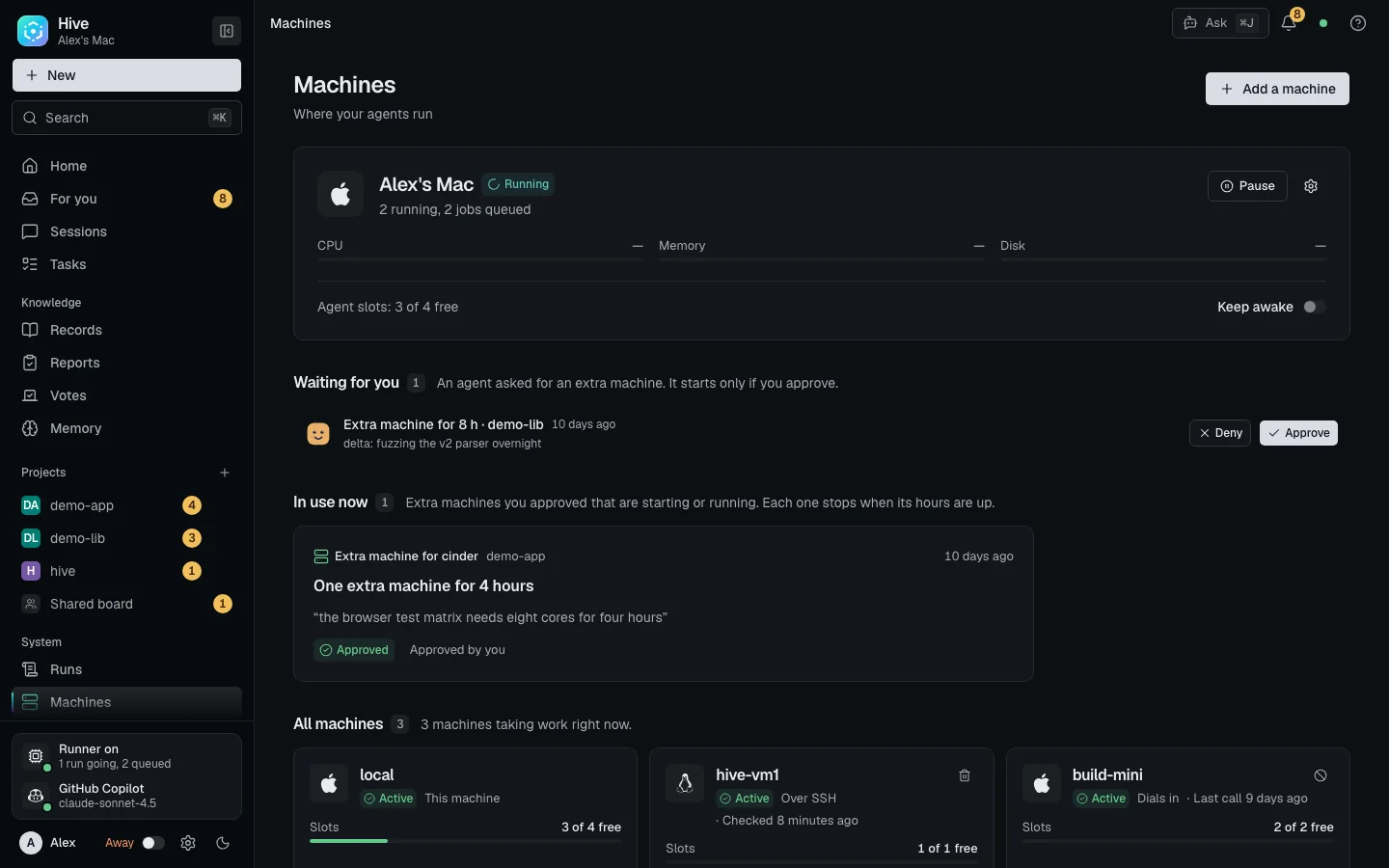
Every machine that runs agents (/compute/), with what it offers (macos arm64 xcode docker; Reserved when it is kept for the work that needs it,
Machines: what runs where; this machine's card
links to the setting that changes its words), and agents' requests for more
machines (size, hours, why). Add a machine starts with Run one
command on it: a six-word join code, good for ten minutes and one join, and
the hive-hand join line to copy to the machine. The step says when the
machine has joined. A machine that dials in shows its last call and a
Revoke button that drops its key (Enrolling a
hand). The other ways pair a machine over
ssh, add one prepared by hand, or rent one. Approve or deny; approved requests are provisioned
by the configured provider (compute.provider: azure, aws, gcp, or
multipass for a VM on the hub machine itself; hive compute providers lists
them) inside the caps you set. Every provider works through its own CLI logged
in as the daemon's user (az login, aws configure, gcloud auth login, a
running multipassd) - Hive stores no cloud credential - boots Ubuntu 24.04
with the same cloud-init, learns the machine's ssh host key over a channel the
provider vouches for before the first connection, and tags what it makes
hive=hands with the request id. Nothing is bought before the daemon has a
linux hive binary for the size's architecture to pair the machine with
(HIVE_HANDS_BINARY, a hive-linux-amd64/-arm64 beside the hub's binary,
or a cross-build from the brain project's checkout - rustup target add x86_64-unknown-linux-musl, plus cargo-zigbuild and zig on macOS), nor
while there is no login source for the machine (hive executor token --with-token, or the brain's own harness sign-in): the request is held, not
failed, and the hold is explained once a day. Once the machine answers, the
daemon waits for cloud-init, pairs it as hive pair would (the machine has
no Copilot login yet, so a probe that lacks only that leaves the hand paired
and waiting rather than failing it), places the login over the admin session,
and probes again; the hand is active and the request ready when that
probe passes. Every step reaches the daemon log as compute CR-NNN: ... and
the request's card on this page carries the latest one while it runs. A
request that fails after that point carries the reason the way the daemon
saw it - the probe's note (under 10 GiB free on /srv/hive), the step that
failed - on its card and in the finding, releases what it created first (on
Azure the VM and its public IP, VNet and NSG), and removes the executor row
the pairing registered together with the ~/.ssh/config blocks and
known_hosts lines written for the machine, so no probe keeps trying an
address that is gone; the sweep every 30 minutes releases any machine
still running under a request that is over - a daemon restarted mid-create
cannot leave one billing - and removes the hands-cr-NNN executors older
daemons left behind once their machine is released. A request that failed before a machine was ready
gives its hours back to the day's compute.max_hours_per_day: nothing was
bought, so the retry that fixes the cause is not held by the attempt that found
it. The daemon's own next request waits first, 5 minutes and longer after
each further failure (machines.md,
"When a request fails"); a request you make yourself does not. Each
executor row offers the same preview-then-remove as hive remove executor.
Add machine on the same
page takes a machine in without the terminal, three ways: Pair does what
hive pair does from an admin account on a Linux machine - the console
answers at once, the pairing runs on the hub, and its report sits above the
machines until you dismiss it; Register adds a machine you prepared by
hand (hive executor add, with a probe when asked); Ask the cloud makes
a compute request in your name, approved on the spot
(Adding a machine from the console).
Settings
Runner caps, board rules, amendment quorum, the models the runs get
(worker_model for the work that changes code - task, improve and experiment
jobs; light_model for the rest - the lead, answers, ballots, reflects,
onboarding, the sealed held-out call and the login check - which means
worker_model while empty, so a cheaper model can take the routine: hive settings set worker_model claude-fable-5.1 and hive settings set light_model claude-sonnet-5; measure_model for the loop's fixture measurements,
worker_model while empty, so the evaluator can be pinned while the worker
changes; and the reasoning effort each of those asks for - worker_reasoning,
light_reasoning, measure_reasoning - harness.reasoning while empty), the
compute provider and its target (Azure resource group / location / VM size, AWS
region / instance type, GCP project / zone / machine type, Multipass size), the
self-improvement loop's gates, the harness (which harness runs the workers, the
provider, the step, per-command time and output limits - see
The harness), and your presence (owner.presence: present, or away to let each
project's lead decide board proposals with its best judgement - see When the owner
is away). Secret-shaped values are stored but
never echoed; the held-out evaluator directory is owner-private and is masked
in every agent-facing view and event.
Reaching the console from anywhere
The console listens on 127.0.0.1 and nowhere else; hive hub --host
refuses any other address. Other machines and phones can reach it through
a front: a web address you run yourself that decides who may come in
and relays their requests to this machine. Hive ships no front and nobody
runs one for you (ADR-071); what is built is the brain's side of
one. The brain does not trust the front: every write that comes through it
must carry a member's passkey signature, and the brain checks that
signature itself.
The console answers only to the host names localhost, an IP address or a
name listed in the setting hub.hosts (empty by default); any other Host
header gets 403, which stops DNS rebinding. To open the console in a
browser under a name of your own, through a tunnel or a proxy, add that
name first (hive settings set hub.hosts hive.example.com); the routes a
hand calls are exempt (Enrolling a hand).
What this machine does today:
-
Open it. Set Settings → Reaching the console from anywhere →
hub.allow_remoteto the front's origin, such ashttps://team.example.com(hive settings set hub.allow_remote https://team.example.com). It counts only when you set it. A value an agent wrote is ignored, so no agent can open the console. Clear it to close the console to the front at once. -
Give the relay a port.
hive hub --front-port 8766also listens on127.0.0.1:8766for the front's relay. The serving output adds aFront relay on ...line that says whether the relay is open. Every request on that listener is treated as remote, whateverHostit names:- while
hub.allow_remoteis empty, every request gets 403; - reads pass;
- routes that only work on this machine (folders, credentials, held-out fixtures, job repair) refuse it.
- while
-
Register the members' passkeys.
GET /api/v1/memberslists them.POST /api/v1/memberswithX-Hive-Members: yesand{credential_id, member, name, role, public_key}registers or replaces one.public_keyis the passkey's ES256 SubjectPublicKeyInfo in base64url, androleisownerormember.DELETE /api/v1/members/<credential_id>revokes one. These member routes work on this machine like any other write; through the front they also need an owner's passkey. -
Sign every write. The browser asks for a nonce with
GET /api/v1/nonce, which answers only whilehub.allow_remoteis set. A nonce lasts five minutes and can be spent once. The browser then signs the challengeSHA-256("hive-write-v1\n" + nonce + "\n" + METHOD + " " + path?query + "\n" + body)withnavigator.credentials.get(the front's host asrpId,userVerification: "required"). It sends the write with the nonce inX-Hive-Nonceand the assertion, base64url, inX-Hive-Passkey-Credential,X-Hive-Passkey-Authenticator,X-Hive-Passkey-Client-DataandX-Hive-Passkey-Signature. Before the write reaches its route, the brain checks:- the type, challenge and origin in the client data;
- the front's RP ID hash;
- the user-present and user-verified flags;
- that the signature counter moved forward;
- the ES256 signature under the member's key.
Only after these checks does it spend the nonce and record the counter. An unsigned write, a spent or made-up nonce, another key, another body or a counter that did not move gets 403 with the reason. Settings and members changes need a member whose role is
owner.
Not part of Hive: the front itself. No web login and no relay ship with it, and the hosted one that ADR-070 planned was withdrawn (ADR-071). Until you put a relay there, nothing outside this machine reaches the relay port. See Security notes for the model.
Notifications
Settings → Notifications (/settings/#notify) has three switches, all
off until you turn them on:
- When something waits for you: every item For you counts (a proposed decision, a proposal, a question only you can answer or a loop stop, a compute request, suggested work the agents could not settle, a drafted constitution or evaluators, a gate step), a task whose lead waits for your reply, and a conversation whose agent asks you something or asks to run a tool.
- When a task or session finishes: a task done, a session its agent finished, and an agent's reply that ended its turn. A sub-session reports to its parent, not to you; a session you closed yourself and the session or task you are looking at stay quiet.
- Play a sound: a short two-note chime the page makes itself (no sound file). Browsers start sound only after a click or a key press on the page, so the chime waits for your first one after a reload; until then the browser's own notification sound stands in. Play the sound tries it.
While the console tab is in front, a note appears at the bottom right with Open; in the background the browser shows a notification, and a click opens the page it is about (the conversation, the task, the project's For you tab, the record, Machines). Turning a switch on asks the browser for permission; a browser that blocks the console still gets the note on the page and the chime, and the card says how to allow it. More than three things at once become one notification ("5 things wait for you").
The choices and what has been told live in this browser's localStorage
(hive.notify, hive.notify.seen), not in Hive's settings: another
browser, or another person on the console, decides for itself, and nothing
reaches agents. Each thing notifies once - by its id (a question's post, a
conversation's pending question, a task's latest lead message, a
conversation's turn count), kept across reloads and shared by every tab, with
one tab at a time doing the telling. Turning notifications on starts from
now: what already waits is taken as seen, never replayed. They come only
while a console tab is open: a hidden tab checks the few lists it needs every
30 seconds while notifications are on (browsers slow a background tab's
timers to about once a minute). The rules are in
web/hub/src/lib/owner-notify.ts (tested in owner-notify.test.mjs); the
shell's OwnerNotifier delivers them. In the Mac app they are
Mac notifications.
Automations
The standing jobs of every project on one page (/automations/): the ones
each project keeps in its repository, one file per automation under
.hive/automations/ (and the older
schedules: list of .hive/hive.yaml, still read), and the ones set by
hand (hive schedule add, or a lead). A strip at the top shows the next
seven days with a dot for each scheduled run. Below it the automations are
grouped by project, under a line with the repository's state - the folder
and how many files it holds, the list file when there is one, when the
daemon last read them - and any problem the daemon wrote down. Each
automation is a card: its cadence in your own time zone, the next start
(Due now once the daemon is behind it), the last five results, where it
is kept (in .hive/automations/NAME.yaml, in .hive/hive.yaml with its
#name, or set by you / set by AGENT) and its status. A file the daemon
has not applied yet, or holds because of a problem, has a card of its own,
marked Not applied yet or Held. What is held or failing comes first,
with its problem in one sentence and a Fix button; a check or watch
whose script sits outside .hive/ carries a warning mark that names the
path it belongs at. A card's one button is Run now (Resume on a
paused one); History, Pause, Edit, Move into the repository
and End it are in its More menu. History opens what happened to the
automation, newest first: each run of its script with the exit code, how
long it took and the state it left (green or red, quiet or broken), the
job a run queued or found still open and where that job stands now, every
turn of state with the finding posted, and every change by hand or by the
file (added, changed and what changed, paused with its note, resumed, ended,
run now) - with the last output in full at the top and the jobs it queued
below; Older pages back through the rest. Run now, Pause,
Resume and End it are the hive schedule verbs, in your name. What
the daemon said about a skill folder is the Skills page's business and does
not show here.
New automation writes the YAML for you: the project, what it does (a
task, improve, clean or reflect job; or a check or a watch that runs a
script), a title that proposes the name - lowercase, digits and dashes;
the file is named after it and it must be unique in the project - a cadence
from the presets or typed (45m, 3d), the clock for a cadence of whole
days, the brief and an optional skill - or the script, which lives under
.hive/ (.hive/automations/<name>.sh is proposed; an edit may keep a
script that already runs from outside), and the kind of job a
red run queues - and under More the tier, the priority, the custom
agent, how many times it runs and whether it starts paused. The preview
beside the form is the file exactly as it will sit at
.hive/automations/<name>.yaml (or the item exactly as it will sit under
schedules:, when you edit one the list keeps), built and checked by the
hub with the code the daemon applies the files with: the cadence, the kind,
a script that exists on the default branch, a skill that is enabled for the
project, an agent that loads, a name no other file or list item holds. What
the daemon would hold is red before anything is written. Two ways to keep
it: Add to the repository writes the file on the project's default
branch as one commit - a checkout that has the branch out is used when its
copy of the folder is clean and otherwise the commit is made against the
branch itself with no working copy touched; nothing is pushed, the commit
travels with your next push - and applies it at once with the daemon's
sync, so the schedule is there in the same breath. Keep in the store
sets it by hand, as hive schedule add would, for a job that should not
travel with the code. Edit on a repository-kept automation rewrites its
file (or its list item) in place and commits; a new name moves the file in
the same commit, and the old schedule ends as a new one starts; on a
hand-set schedule it updates the row. Move into the repository moves a
hand-set schedule into a file of its own: the file takes over and the row
ends with a note saying where it went. End it on a repository-kept
automation deletes its file (or takes its item out of the list), because
ending the row alone would last only until the next commit that touches the
folder.
The hub serves the page at GET /api/v1/automations?project= (each project
with its folder - automations: {dir, files: [{path, name, text, entry, problems}]} - its list file when there is one - path, branch, commit,
entries, problems - what the daemon last applied, applied, with the
files it read, and its schedules, plus limits and the kinds),
POST /api/v1/automations/check ({project, entry, where?, replace?}: the
YAML, its path, the form it takes - file or list - the problems and a
warning, nothing written), POST /api/v1/automations ({project, entry, where: "repo"|"store", replace?: NAME, id?: SCHED-NNN, move?: SCHED-NNN}:
the commit and the schedule, or 400 with problems[]),
POST /api/v1/automations/remove ({project, name, note?}),
POST /api/v1/automations/<id>/pause|resume|end|run ({note?}) and
GET /api/v1/automations/<id>/history?before=SEQ&limit=N (the schedule,
its entries newest first - each with seq, at, actor, what (ran,
fired, skipped, red, green, added, updated, paused, resumed,
ended, run) and, as they apply, run, rc, timeout, seconds, state, previous, job, job_status, job_agent, job_finished_at, queued, why, note, changed[] - more when older entries exist below the last seq, the
jobs it queued and its last_output). entry
takes the fields of an automation file: name, title, every, at, kind, brief, skill, script, job_kind, tier, priority, run_as, times, paused.
Runs
Every run row records what it cost as it ends: the prompt and completion
tokens of the harness sessions it ran, summed from their steps, and the
provider's priced cost where the provider reports one (runs.prompt_tokens,
runs.completion_tokens, runs.cost; the run log says
cost: 1500 prompt + 100 completion tokens, 0.04 (provider units) and the
run.finish event carries the same numbers). A task's Work feed shows
each run's tokens and cost on its chapter line, and hive status adds a
cost today row per job kind, the dearest kind first, beside an outcomes
row counting how the day's runs were classified (code from the worker's
SUMMARY: outcome code, text from the regex fallback, none without a
summary):
cost today task 12 runs, 4.1M prompt + 58.2k completion tokens, cost 3.10
           lead 30 runs, 610.0k prompt + 9.8k completion tokens
outcomes   10 code, 31 text, 1 none today (code = the worker's SUMMARY outcome code, text = regex fallback)
hive status --json carries both as cost_today and outcomes_today. No
kind is capped or ranked by cost yet.
Every worker run (/harness/) as the harness saw it: which job, agent, machine
and model, how many model calls and commands, tokens, how it ended (finished,
or why it stopped: step limit, time limit, format errors, provider error, not
signed in), and the transcript step by step - the model's message, the command,
the output - live while it runs. Its Sign-in & models button opens
Settings → Harness, which holds the sign-in card, the provider's models and
the limits.
Records
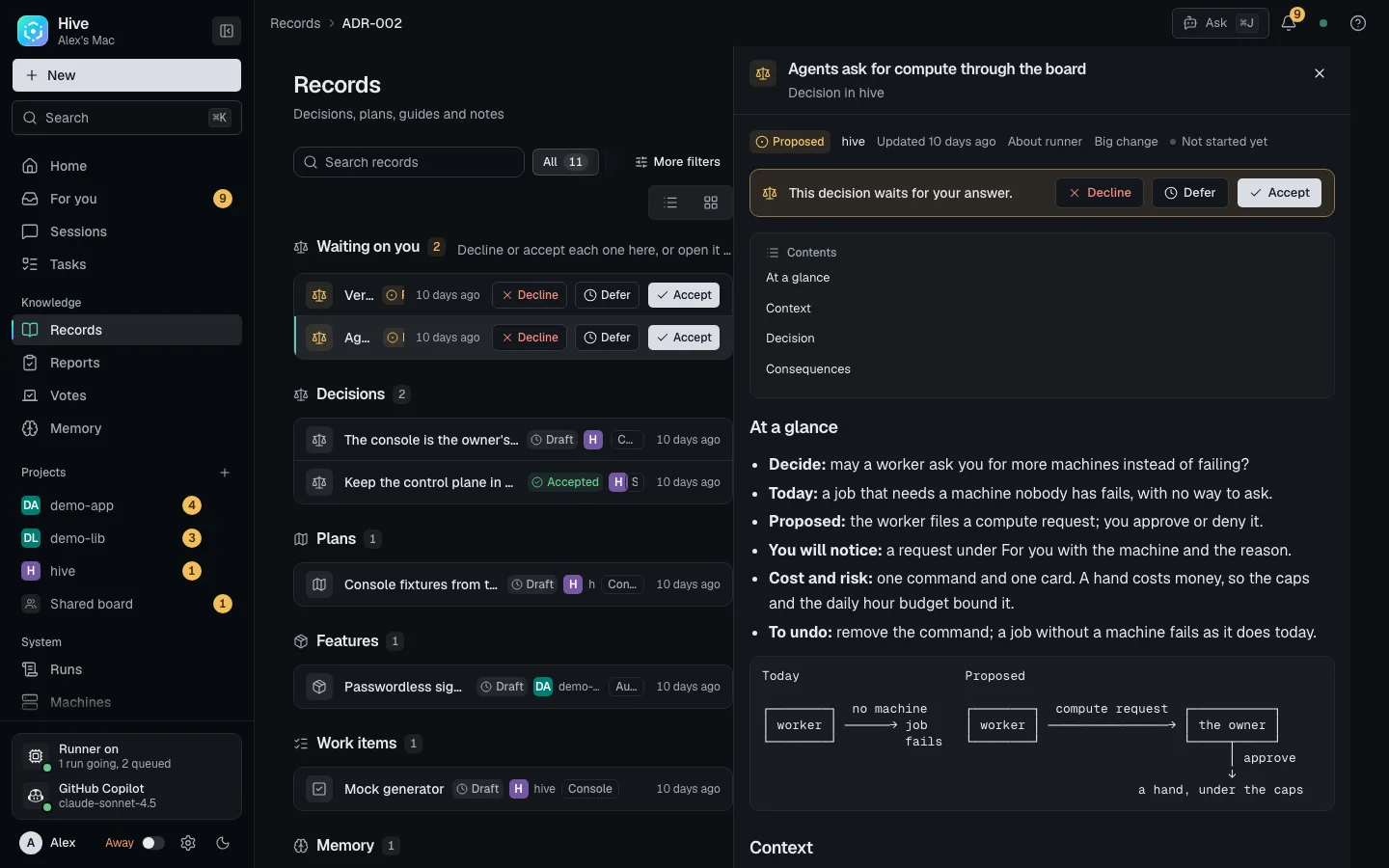
ADRs, plans, features, guides, memory, prompts, environment recipes, the constitution and the evolution archive, with revisions and delivery marks.
The decisions that wait for you come first, under Waiting on you, each with Decline, Defer and Accept. A click on a record opens it beside the list, and a long record gets a list of its contents. A decision record opens with At a glance, a few lines the owner can decide from, and a diagram of the change drawn in text (Diagrams in the docs).
Reports
Reports (/reports/, under Knowledge) lists every done task, newest
first, as a work report: what each of its jobs landed and where (the merged
commit, the pull request, or "not landed"), the first release tag that
contains the landed commit (the nearest one), whether the project's check passed, and the
evidence the agent left in its job folder. Open a task to see its brief and
one panel per job: the agent's summary, the landing, the commit and pull
request links, the checks named in the job's report.json, and every file
in the job's artifacts folder - Open the report opens report.html
when the job wrote one. The project picker narrows the list to one project,
and the search box matches task words, job ids, agents and release tags.
The page reads GET /api/v1/reports[?project=SLUG][&limit=N] (newest first,
50 by default, at most 200): each done task with its jobs, and for each job
its landing (land.merged, land.landed or land.pr with the commit,
pull request and verify line), the release tag (git name-rev --tags on the
project's checkout), the run's verify line, its artifact files and the
title, summary, status and checks of its report.json.
What just happened
The live event feed (server-sent events over the store's event log) is on a project's History → Timeline, under Everything that happened; Home has no such feed. The project's Board tab lists every thread with its status, participants, last activity and the questions and claims still open.
Ask
A quick answer in your own words about a project, or all of them (⌘J / Ctrl-J,
the Ask button under Search, or a question typed into ⌘K): what waits for
me?, what is blocked, and on whom?, what changed today?. The panel opens
on the project of the page you are on and switches with a picker. Each answer
is a few sentences that name what it is based on - the posts, records, tasks,
jobs and runs it drew on, listed under Based on with links - and a
follow-up keeps the thread; the conversation lives in this browser tab only and
clears when the tab closes. Asking changes nothing: the store gets one ask
event (question length, model, how long it took - never the words). The answer
comes from the model ask.model names, or the light model, or the main model
when both are empty; Settings → Harness → Models has the picker (a fast
model keeps answers under a few seconds), and hive settings set ask.model claude-haiku-5.5 is the terminal way. With no model signed in, or when the
model is too slow or fails, the panel says so and shows the matching facts
instead - the same lines the model would have read - so the box always answers.
hive ask "what is blocked?" --project my-app is the same from a terminal
(--all for every project, --no-model for the facts alone, --json for the
answer with its sources), and POST /api/v1/ask with {"project": "my-app", "question": "..."} serves other tools; GET /api/v1/ask tells which model
would answer and whether the provider is signed in.
Agents
The console has no Agents page. Home's Working now lists the agents at
work, a project's Team & tools tab shows its lead agents, and Runs
lists every run with the agent that made it. The roster itself is in a
terminal: hive agents lists each agent with its presence, its last
heartbeat and its last useful output, which are separate, and what it is
doing now: the job it holds, the thread it claimed and the executor it runs
on. An agent counts as online with a heartbeat within heartbeat.dead_after
(five minutes by default); an unexpired claim alone does not mean working
now. hive agents --all adds the pruned agents: every worker that ever ran
is there, retired the tick its run ended, since workers are not kept idle.
GET /api/v1/roster serves the same list to other tools.
Passkey sign-in through a front
Built as ADR-070 step 5 and kept for a front you run yourself
(ADR-071). Through a front, a member uses the same
console as the owner does on 127.0.0.1, and the front still cannot act for
anyone. Every write (POST, PUT, PATCH, DELETE) that comes through the front
carries the member's passkey signature. The brain checks that signature
before it writes anything. A console opened on this machine (localhost,
127.0.0.1, ::1) never signs and keeps the same-origin write guard.
There are two pages for this:
-
Passkey (
/passkey/): Sign in with passkey asks the browser (navigator.credentials.get()) for one of the team's passkeys. It then says whether the brain knows that passkey (the member's name), whether the passkey was revoked, or whether the brain has never seen it. After sign-in, each write first fetches a one-use nonce from the brain, then asks the authenticator to sign, then sends the request with theX-Hive-NonceandX-Hive-Passkey-*headers. Sign out forgets the passkey in this browser. Nothing secret is stored there: only the credential id and the member's name are kept. -
Register a passkey (
/passkey/register/): the member types their member name and makes a passkey on this device. Only ES256 (P-256) keys are accepted, because that is the only kind the brain checks. The page prints the line for the owner to run on the brain's machine. It registers the passkey through the members route on the console's own port:curl -sS -X POST http://127.0.0.1:8765/api/v1/members \ -H 'Content-Type: application/json' -H 'X-Hive-Members: yes' \ -d '{"credential_id":"...","member":"ana","name":"ana","role":"member","public_key":"..."}'public_keyis the passkey's SubjectPublicKeyInfo in base64url. The role ismember; change it toownerbefore you run the line to let that passkey change settings and members. The private key never leaves the member's authenticator, and the front never sees it.
What the brain checks
The page and the brain share this format. The page's half lives in
web/hub/src/lib/passkey-state.ts. The brain's half lives in
crates/hive-hub/src/remote.rs and crates/hive-runner/src/webauthn.rs.
web/hub/src/lib/passkey-wire.json is one signed write in this format.
Two tests use it: the hub's npm test checks that the page makes exactly
those bytes and headers, and hive-hub's
the_consoles_signed_write_fixture_is_accepted_by_the_brain checks that
the brain accepts the write. If one side changes and the other does not,
one of the two tests fails.
| Step | Wire |
|---|---|
| Nonce | GET /api/v1/nonce, answer {"nonce", "expires_at", "origin", "rp_id"}. Issued only while hub.allow_remote is set; five minutes, spendable once. |
| Bytes signed | hive-write-v1 \n nonce \n METHOD, a space, path with query \n exact body bytes |
| Challenge | SHA-256 of those bytes, passed to navigator.credentials.get() |
| Headers | X-Hive-Nonce: the nonce as issued. X-Hive-Passkey-Credential, X-Hive-Passkey-Authenticator, X-Hive-Passkey-Client-Data, X-Hive-Passkey-Signature: the assertion's credential id, authenticator data, client data JSON and DER signature, each base64url |
| Registration | POST /api/v1/members with X-Hive-Members: yes and {credential_id, member, name, role, public_key} |
| Refused | a missing header, a reused or made-up nonce, a changed body or path, an unknown or revoked key, a counter that did not move; settings and members need an owner |
Uploads and voice recordings are signed over their raw bytes. JSON writes are signed over the exact string that is sent.
Owner steps
The pages are code only. The owner sets up the parts that cost money or need an account. None of these steps can be done by a worker:
- Domain. Pick the address the team will open, for example
console.example.com. Passkeys are tied to that domain (the WebAuthn relying party), so a passkey made on one domain does not work on another. Pick the domain before members register. - Hosting. Run a front of your own on that domain over HTTPS; Hive
ships none. Browsers only offer passkeys on a secure origin. The front
relays requests to the brain's relay port. It serves this console's
static export (
web/hub/out/) and passes/api/v1/*through unchanged, including theX-Hive-NonceandX-Hive-Passkey-*headers and the exact request body. - A login of your choice. Put the login you trust on the front: it decides who may reach the front at all. The passkey decides what that person may change on the brain.
- Turn on remote access on the brain.
hub.allow_remoteis owner-only and empty by default. While it is empty the brain only listens on this machine. Set it to the front's address, in Settings or withhive settings set hub.allow_remote <origin>. - Add each member's passkey. The member opens Register a passkey
through the front and sends the printed line to the owner. The owner runs
that line on the brain's machine (with
hive hubon its default port 8765; change the address in the line otherwise). After that, the member's Sign in with passkey shows their name, and their writes go through.