Add a second machine
On this page
Pair a Linux machine over SSH, or join a Mac or Linux machine with a code, so jobs can run there. Then say what a project's jobs need from a machine.
Before you start
- Hive runs on your machine with a registered project and the runner
(Set up your first project). The runner is the
console's word for the daemon (
hive daemon). - GitHub Copilot is your model provider and it is connected (Choose models and set budgets). Hive sends a second machine the model names in your settings and no provider: the machine calls GitHub Copilot, with a GitHub login of its own that the steps below place.
- To pair (steps 2 to 4): a Linux machine on x86_64 or arm64 with
gitand glibc 2.36 or newer (Debian 12, Ubuntu 24.04), where an admin account logs in over SSH with a key and runssudowithout a password. - To join with a code (step 5): a Mac or a Linux machine with a terminal.
1. Know what runs where
The machine with the store stays in charge. The store is the file
~/.hive/hive.sqlite, which holds everything Hive knows. That machine runs
the runner, plans the work, delivers the pull requests, and runs the reviews
and the jobs of the lead (my-app-lead, the agent that owns the project). A
second machine runs only the jobs it is handed, each in a clone of its own.
A job is one run of an agent.
The second machine has no store: the board, the settings and your other projects are not on it. Each job arrives on its own, with the code of one branch and a brief. The machine gets no git credential and does not push: your machine fetches the commits, checks who made them and delivers the branch. It does hold your code while a job runs and a model login of its own, and a job's commands run there with that machine's network.
Which job goes where is a matter of words. A machine offers its system
(linux, macos), its chip (amd64, arm64) and labels such as docker.
A job that needs some of these words runs only on a machine that offers
them all. A job that needs nothing fits any machine.
2. Check the machine first
Work from the account that runs the runner. Hive cannot answer a question
during the pairing, so make sure the admin login asks none, not even about a
new host key. Then let Hive read the machine: with --dry-run it changes
nothing, on either side.
ssh admin@linux-box.example.com sudo -n true    # prints nothing when the key and sudo both work
hive pair admin@linux-box.example.com --name linux-box --dry-run
The dry run prints what it found (uname=Linux, sudo=yes and more), the
script it would run there as root, the script that undoes it, and what it
would change on your machine. Hive refuses to pair a machine that is not
Linux, and an admin whose sudo asks for a password. The name is how Hive
lists the machine: lowercase words with dashes, and not local. Do not name
it exactly as the host after admin@: the SSH Host block of step 3 would
then cover your admin login too, and offer Hive's key, not your default keys.
3. Pair it
hive pair admin@linux-box.example.com --name linux-box
The run registers the machine in the store, and it changes two more places:
- On
linux-box, as root. Ahiveuser. The program, as/usr/local/bin/hive-handswith/usr/local/bin/hivelinked to it. The work directory/srv/hive. One line in that user'sauthorized_keys, which lets Hive's key run its job commands and nothing else.mise, downloaded from GitHub and checked, which installs the tools a project pins. A file for sshd,/etc/ssh/sshd_config.d/60-hive-hands.conf, which turns off passwords, forwarding and terminals for that user. - On your machine. A key,
~/.ssh/hive_hands_ed25519, when there is none yet. AHost linux-boxblock at the end of~/.ssh/config, for thehiveuser and that key; the file as it was is kept as~/.ssh/config.bak. The machine's host keys in~/.ssh/known_hosts.
The program Hive copies there is a Linux hive: its own, when your machine
is Linux on the same chip. From a Mac the run stops before it changes
anything, with no Linux hive to send to that machine, and names the release
archive to download. Unpack it and name the file, with the tag for TAG:
HIVE_HANDS_BINARY="$PWD/hive-TAG-x86_64-unknown-linux-gnu/hive" \
  hive pair admin@linux-box.example.com --name linux-box
On a new machine the run ends with exit status 1, and its summary starts
with the line below. That is expected: the machine is paired, and it takes
no work until it has a model login. Under it, the probe line reads
FAILED: harness login missing and the next line names the next step.
paired linux-box: drained (the probe did not pass)
4. Give it a model login
hive executor login linux-box --admin admin@linux-box.example.com   # a login for its hive user
hive executor probe linux-box                                       # checks the machine again
The first command places a GitHub login for Copilot on the machine: the
token you stored with hive executor token, or else your own GitHub Copilot
login when that login reaches no repository. With neither it stops with
No login source for executor linux-box. Then pipe a GitHub token into the
same command with --with-token added. It takes a fine-grained token with
the Copilot Requests permission and refuses a classic one.
Once the login is stored, Hive probes the machine and makes one small model
call there. When the model answers, the machine is active and takes work.
The probe prints linux-box ok, active: and what the machine reported, such
as its system, its free disk and the docker it found.
5. Or join a machine with a code
hive pair takes Linux only, and you may not want to hand Hive an admin
login. Then the machine joins by itself: it keeps a key of its own, calls
your Hive for work and opens no port. On the second machine, install both
programs and give it a model login:
curl -fsSL https://hivefleet.dev/install.sh | sh -s -- --hand   # hive-hand, in ~/.hive-hand/bin
curl -fsSL https://hivefleet.dev/install.sh | sh                # hive, in ~/.hive/bin
export PATH="$HOME/.hive/bin:$HOME/.hive-hand/bin:$PATH"
hive harness login                                              # this machine's model login
On your machine, open Machines in the console, choose Add a machine, keep Run one command on it and choose Get a join code.
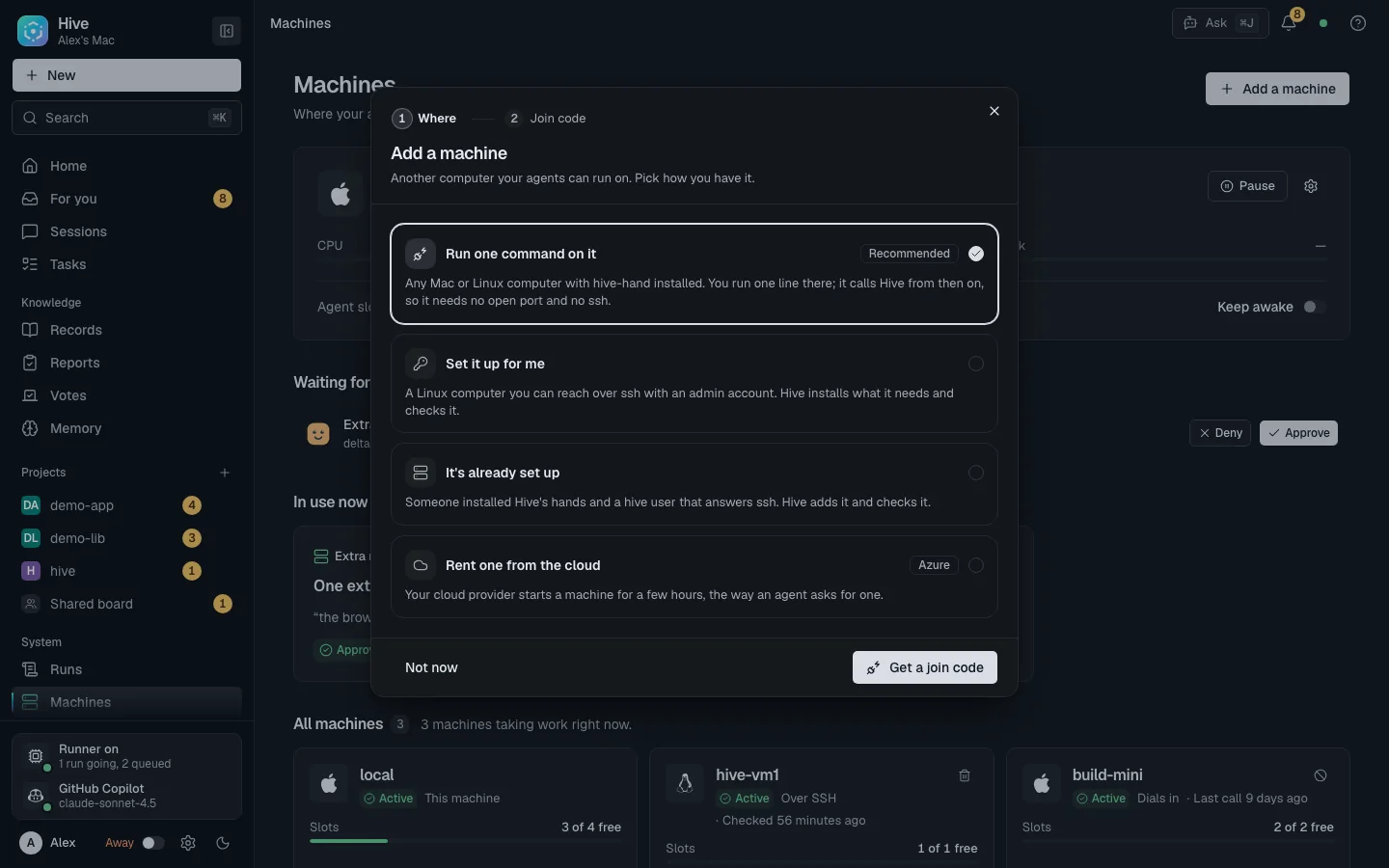
The dialog shows a six-word code, good for ten minutes and one join, and the
line to run on the machine. The console listens on 127.0.0.1 only, so that
address reaches it from your own machine alone. The dialog says so and shows
two lines instead: an SSH tunnel to your machine, then the join through it.
ssh -N -L 8765:127.0.0.1:8765 YOU@THIS-MACHINE &
hive-hand join --brain http://127.0.0.1:8765 amber-river-cobalt-maple-orbit-lantern
Put your login and your machine's name in place of YOU@THIS-MACHINE; your
machine has to accept that SSH login. The tunnel puts the whole console
within that machine's reach, not only the join, so open it between machines
of your own. hive-hand join prints joined ... as ... with the name the
machine is listed under: its host name, unless you add --name linux-box.
It then stays connected, and the dialog changes to Machine joined. Keep
the tunnel open, and on every later start run hive-hand dial. A code that
has lapsed or was used is refused: choose New code.
6. Say what a machine offers and what a job needs
hive executor list
local          active      this machine                   workers 6 busy 0 projects *
               offers macos arm64 xcode
local is the machine with the store. linux-box has a block of its own
under it, with its own offers line. A machine finds its system, its chip,
docker and xcode by itself. Add other words yourself:
hive executor label linux-box +gpu      # adds a word; -gpu takes it away
hive settings set machine.labels gpu    # the whole list for the machine with the store
A job that needs nothing fits either machine. Set needs when a job must have something. For one job that you queue yourself, say it on the job:
hive job add --project my-app --title 'Rebuild the images' \
  --brief 'Run docker build for each service and say what failed.' --needs linux,docker
For every job of a project, set the needs on the project. They bind the
lead's jobs and the reviews too, and those run only on the machine with the
store: when it lacks one of the words, they wait in the queue and nothing
plans the project's tasks. So give a project only words local offers. In
the list above that rules out linux and docker; gpu is a word both
machines now offer. In the console, open the project and its tab
Team & tools: the panel Runs on has Change. Or, in the checkout:
cd ~/code/my-app
hive init --needs gpu    # prints: refreshed project my-app at ~/code/my-app
A line needs: [gpu] in the project's .hive/hive.yaml does the same
once it is on the default branch, and replaces what you typed. Runs on
then lists each machine as fitting, or names the word it lacks.
7. Take a machine out of work
hive executor drain linux-box      # for a while: running jobs finish, no new job starts
hive executor probe linux-box      # back to work, when the probe passes
hive remove executor linux-box     # for good: shows what changes, then asks
hive executor activate linux-box   # undoes a remove, while the machine still answers
hive remove executor deletes nothing on the machine. Its preview prints
the commands that remove the hive user and the work directory. Run them
in a session of the admin's: the printed line goes through ssh linux-box,
the login that runs Hive's job commands and nothing else. In the console, a
paired machine's card has Remove machine… and a joined one
Revoke its key…: Hive forgets the key and sends that machine no more work.
Check that it worked
- In the console, Machines lists
linux-boxunder All machines. Its card says Active, and Over SSH (paired) or Dials in (joined). - In a terminal,
hive executor listshowslinux-boxasactive, andhive executor probe linux-boxprintslinux-box ok, active:. - After a job has run there, open it on Runs: its Technical details
have a Machine row that names
linux-box.
When something goes wrong
sudo without a password is required. The pairing usessudo -n, which never asks. The program's own advice is aNOPASSWDrule: onlinux-box, runecho 'admin ALL=(ALL) NOPASSWD: ALL' | sudo tee /etc/sudoers.d/admin. Jobs do not use that login: they run as thehiveuser.- The card says Not taking work. Its Why: line gives the last
probe's reason. For
harness login missing, do step 4. Forunder 10 GiB free on /srv/hive, free space there. Then probe again. - The card says Can't reach it. After three failed connections in a row
Hive sends no work there. A probe that passes puts it back. Hive probes a
paired machine by itself, at growing waits;
hive executor probe linux-boxchecks at once. A joined machine also comes back when it connects again: with its tunnel open, starthive-hand dialthere again. - A job waits and no machine takes it. On the project's Team & tools
tab, Runs on names the word of the project's needs that each machine
lacks, and says Nothing can take this project's jobs right now when no
active machine fits. The lead's jobs and the reviews need
localto fit (step 6). Label a machine that has the tool, change the needs, or let one waiting job run anywhere withhive job needs JOB_ID -. - Set it up for me ends with The setup didn't finish. The dialog says
The setup stopped and shows the report. With the line
paired linux-box: drained (the probe did not pass)in it, the machine is paired and waits for its model login, as in step 3: do step 4. Words picked under What it offers were not saved: add them withhive executor label.
Read more
- Machines and paired hands: every step of pairing and joining, where a job goes, and how Hive notices a machine that went quiet.
- The machines you pair: what a second machine is sent, what it never gets, and how to revoke it.
hive-hand: installing the program a joined machine runs. The Mac app joins a Mac.