Choose models and set budgets
On this page
Connect a model provider, give each kind of run its own model, and set how much one run and one day may use.
Before you start
- Hive is installed and the console opens at
http://127.0.0.1:8765(Install). - You have one of these: a GitHub account with GitHub Copilot, an API key of another provider, or a model server such as Ollama on this machine.
1. Connect a provider
Hive's agents call a model through one provider at a time. GitHub Copilot is the default. In the console, open Settings and then Harness. The block Model provider names the provider and says Connected or Not connected. When it says Connected before you have signed in, Hive found a GitHub login for Copilot on this machine (in the environment, from an editor or from the Copilot CLI) and borrows it: go on to step 3. Otherwise choose Connect GitHub Copilot. A dialog opens at its Connect step:
- Choose Sign in with GitHub. A short code appears.
- Choose Copy code, then Open GitHub. Enter the code there and approve. The dialog notices by itself and says Connected as with your GitHub name.
- Choose Continue. The Models step proposes a Main model and a Light model from the provider's list. Step 3 says what each is for.
- Choose Continue, then Save. The dialog ends with Agents now use GitHub Copilot.
That is GitHub's sign-in, not Hive's: Hive has no accounts. The same from a terminal:
hive harness login # prints an address and a code to enter there
It ends with Signed in as, your GitHub name and (GitHub Copilot).
2. Use a key or a local server instead
In Model provider, choose Change provider, or Choose another provider while none is connected. The dialog starts one step earlier, at Provider, and lists every provider this Hive can use:
| Group in the dialog | Providers | The Connect step asks for |
|---|---|---|
| Sign in with an account | GitHub Copilot, Anthropic Claude, GitHub Models, Azure OpenAI | a sign-in in your browser, or a key or token; Azure OpenAI also asks for your resource's address |
| Use an API key | OpenAI, Google Gemini, OpenRouter, Groq, Mistral, DeepSeek, xAI Grok, Together AI, Fireworks AI, Cerebras | the key |
| Run models on this computer | Ollama, LM Studio, vLLM | the server's address, and a key only when your server asks for one |
| Something else | Another OpenAI-compatible server | its address, and a key unless the server needs none |
- A key. Pick the provider and choose Continue. Paste the key into the field, which for OpenAI is labelled OpenAI API key, and choose Connect. Hive checks the key with the provider before it keeps it.
- A local server. Pick Ollama and choose Continue.
Server address already holds
http://127.0.0.1:11434/v1. Choose Check the connection. The dialog answers Reached it and the number of models the server has.
Then go on through Models and Review as in step 1. The last button reads Switch to and the provider's name. The provider in use changes when you press it, and runs that have started finish on the old one.
From a terminal, connect first and switch last:
printf '%s' YOUR_KEY | hive harness login --provider openai --with-token
hive harness models --provider openai    # the model ids this key can use
hive settings set provider openai        # new runs use it from now on
The first line hands the key over on standard input; typed like this it
also lands in your shell's history, which the console's field avoids. A
local server needs only the switch, hive settings set provider ollama;
another address than the default goes into the setting
provider.ollama.base_url. A switch made this way leaves the model
settings as they were, with the old provider's ids, so set them next
(step 3).
Where a key is kept
A pasted key or token, and a sign-in with GitHub or Microsoft, is a file on
this machine: ~/.hive/private/providers/<provider>.json, which only your
user can read. It is not in the store (~/.hive/hive.sqlite), where the
settings are. A sign-in with Anthropic stays with Anthropic's own program,
ant, which must be installed on this machine. Hive uses a key for calls
to the provider, and the console shows its last four characters and never
the whole key. The one login Hive can copy elsewhere is a GitHub login for
Copilot, to another machine of yours
(Add a second machine).
hive harness logout --provider openai removes the file.
A job runs as your user. What keeps its commands away from that folder is a check on the text of each command: a rule, not a barrier (Security notes).
3. Choose a model for each kind of run
A job is one run of an agent. Hive puts its runs into four groups, each with a model setting of its own. In Settings, under Harness, the block Models has a list for each. A choice is saved as soon as you make it.
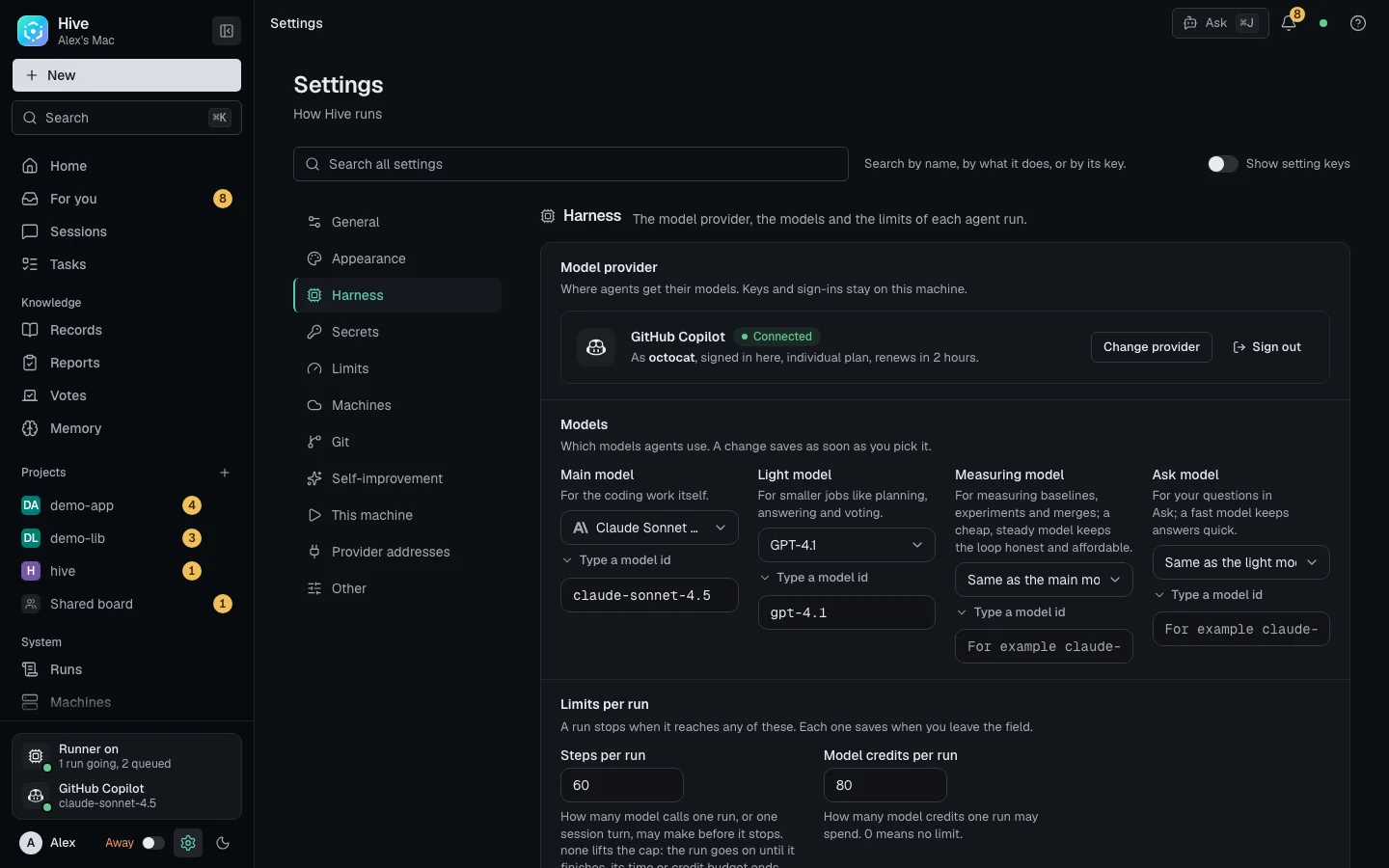
| In the console | Setting | The runs it serves | While it is empty |
|---|---|---|---|
| Main model | worker_model |
the runs that change code: task, improve and experiment jobs | the provider's default model |
| Light model | light_model |
the light runs: the lead's planning, answers, votes, reflections, reviews and the like | the main model |
| Measuring model | measure_model |
the measurements of the self-improvement loop | the main model |
| Ask model | ask.model |
your own questions in the console's Ask | the light model |
The lead is the agent that owns a project and plans its tasks
(my-app-lead). From a terminal:
hive harness models                               # the provider's model ids; * marks its default
hive settings set worker_model claude-fable-5.1   # an id from that list
hive settings set light_model claude-sonnet-5
hive settings get worker_model                    # prints: claude-fable-5.1
Hive saves a name as you typed it and does not compare it with the provider's list, so copy the id.
Beside the models are Main effort, Light effort and Measuring
effort (worker_reasoning, light_reasoning, measure_reasoning): how
hard the model is asked to think, from minimal to max. While empty, the
main and the light effort follow the setting harness.reasoning, and the
measuring effort follows the main one. The default of harness.reasoning
sends nothing and leaves the choice to the model.
hive settings set worker_reasoning high
GitHub Copilot falls back to the nearest effort a model offers. With the OpenAI-compatible providers, a model that does not take the field rejects the call. The Anthropic and Gemini providers ignore these settings.
4. Set the budgets
| Setting | Console | Default | What it bounds | When it is reached |
|---|---|---|---|---|
harness.max_steps |
Steps per run | 60 |
model calls in one run | the run stops; Runs shows it as Hit the step limit |
harness.task_max_steps |
terminal only | empty | the same, for task, improve and experiment runs alone | as above |
minutes_per_job |
Minutes per run | 10 |
wall-clock minutes of one run | the harness stops the run a minute before the cap, and Runs shows Hit the time limit; at the cap the runner stops the worker |
harness.max_cost |
Model credits per run | 0, no cap |
the cost Hive records for the run, in the provider's own unit | the run stops with stopped at the cost budget |
jobs_per_day |
Runs per day (all machines together) | 2 |
jobs started in one UTC day, on all machines together | the agents' own jobs wait until midnight UTC; your tasks, the lead's sittings and answers, reviews and security updates still start |
capacity |
Runs at once on this machine (auto = from its cores and memory) | auto |
runs at one time on this machine; 0 keeps it idle |
further jobs wait in the queue; while the agents' own jobs fill every slot, one run of your own work may still start |
Steps per run, Minutes per run and Model credits per run are under Settings, Harness, Limits per run; a field saves when you leave it. The last two rows of the table are under Settings, Limits, How much work runs. From a terminal:
hive settings set harness.max_steps 80
hive settings set harness.task_max_steps 150    # more calls for the runs that change code
hive settings set minutes_per_job 30
hive settings set jobs_per_day 20               # 0 means no daily cap
A value a setting does not take is refused with the reason, for example
hive: harness.max_steps must be at least 1, not 0. More caps exist, among
them harness.step_timeout (the seconds one command of a run may take) and
lead.research_per_day (the research jobs one project may get in a day);
Settings lists them all. Three things to know:
- Do not count on
harness.max_cost. Hive records a cost only from a GitHub Copilot reply that carries one and is not streamed, and almost every reply of a run is streamed. With any other provider it records no cost at all. The step and time budgets are the ones that hold. - A run on this machine that stops at the step budget with work in its clone is carried on once: the job's next run gets a fresh budget in the same clone.
- Hive holds every run to these numbers, but who may change them is a rule
and not a lock.
hive help settingssays only the owner (you) changes caps, and the program does not refusehive settings setfrom an agent's shell.hive settingsshows who changed each setting last.
5. See what was used
Open Runs in the console. A line near the top sums up the day: the
runs, how many finished or stopped early, and the model credits recorded,
if any. Open a run for its Duration, Credits and Tokens.
Credits shows the cost Hive recorded for the run, and a dash when it
recorded none (step 4 says when it does). From a terminal, hive status
sets the day's count against the cap. Once a run has finished that day, it
adds lines headed cost today: for each kind of job, its runs, their
tokens and the cost, where one was recorded.
runs today 0 of 20 (jobs_per_day)
hive usage is something else. Its help calls it
best-effort local runner token diagnostics; never a ledger. It reads the
token counts that four other agent programs (copilot, claude, codex,
opencode) keep in their own session files on this machine, and not Hive's
runs. It closes with Best-effort diagnostics, not billing. What you are
billed is in your provider's own account.
Check that it worked
-
In the console, Settings, Harness shows the provider with Connected, and your choices under Models. The foot of the sidebar shows the provider and under it the main model, or Default model while none is set.
-
In a terminal:
hive harness status    # the provider, who is signed in, the models and the limits in force
hive status            # its harness line names the provider and the login
Before a sign-in the
harnessline ofhive statussaysnot signed in. After it, the line ends withsigned in asand your GitHub name, the last four characters of your key, or the local server's address. -
After the next job, open it on Runs. Technical details has a Model row with the provider and the model the run used.
When something goes wrong
- The sign-in ends with an error about Copilot access. The message is
this GitHub account has no Copilot access (no seat or plan): the GitHub account you approved has no GitHub Copilot. Use an account that has it, or connect another provider (step 2). - The dialog says Hive couldn't reach the server. The local server is
not running or listens elsewhere. For Ollama the dialog says to start it
with
ollama serveand pull a model. Then choose Check the connection again, or correct Server address. - Runs end as Model provider error after you changed a model or the provider. A model setting may hold an id the provider does not have: Hive does not check a typed id, and a switch from a terminal keeps the old ids. Pick the models again under Settings, Harness, Models, where the lists come from the connected provider.
- A run ends as Hit the step limit or Hit the time limit. Open the run.
Under Result it says Stopped early: it used every step it was
allowed. or Stopped early: it ran out of time. Raise the budget in
step 4. For the runs that change code,
harness.task_max_stepsraises the step budget without giving every small job the same. - Jobs wait though nothing runs. The daily cap may be full. In
Settings, Limits, the row Runs per day (all machines together)
then warns that today's runs already reach the cap. Raise the number, or
set
0for no cap.
Read more
- Providers, sign-in and models: every provider, its environment variables and its address setting.
- Budgets, context and compaction: what a long run does about a full context window.
- Settings: every setting with its default.
- Secrets: where each kind of secret rests.
- Set the rules agents work under: the kill switch, which stops all work at once.