Run work on a schedule
On this page
Set up a weekly job for an agent and a script that checks your site every half hour. See both in one place, and pause or end them.
Before you start
- Hive is installed and the console opens (Install).
- The project
my-appis registered and the runner is running (Set up your first project). The runner is the console's word for the daemon (hive daemon). It does the scheduling.
1. Choose the kind of schedule
A schedule belongs to one project and comes round on a cadence. A job is one run of an agent. There are three kinds of schedule:
| Kind | What runs each time | Model calls | Use it for |
|---|---|---|---|
A standing job: task, improve, clean or reflect |
An agent, in one job, from the brief you wrote | On every run | Work that needs judgement, such as a weekly dependency review |
check |
A script from your repository, run by the runner | Only when the script fails | What must stay true: the site answers, the tests pass |
watch |
A script from your repository, run by the runner | Only when the script prints something or keeps failing | What arrives from outside: a new issue, a new release |
task is the usual standing job. The other three queue an improvement, a
clean-up pass or a reflection instead.
2. Add a standing job
In the console, open Automations (under System in the sidebar) and choose New automation. Fill in the form:
- Project:
my-app. What it does: Task. - Title:
Weekly dependency review. The Name fills in from the title. - How often: Every week. Time of day, in UTC:
09:00. - Brief: what the agent does each time, and how it can tell it is done.
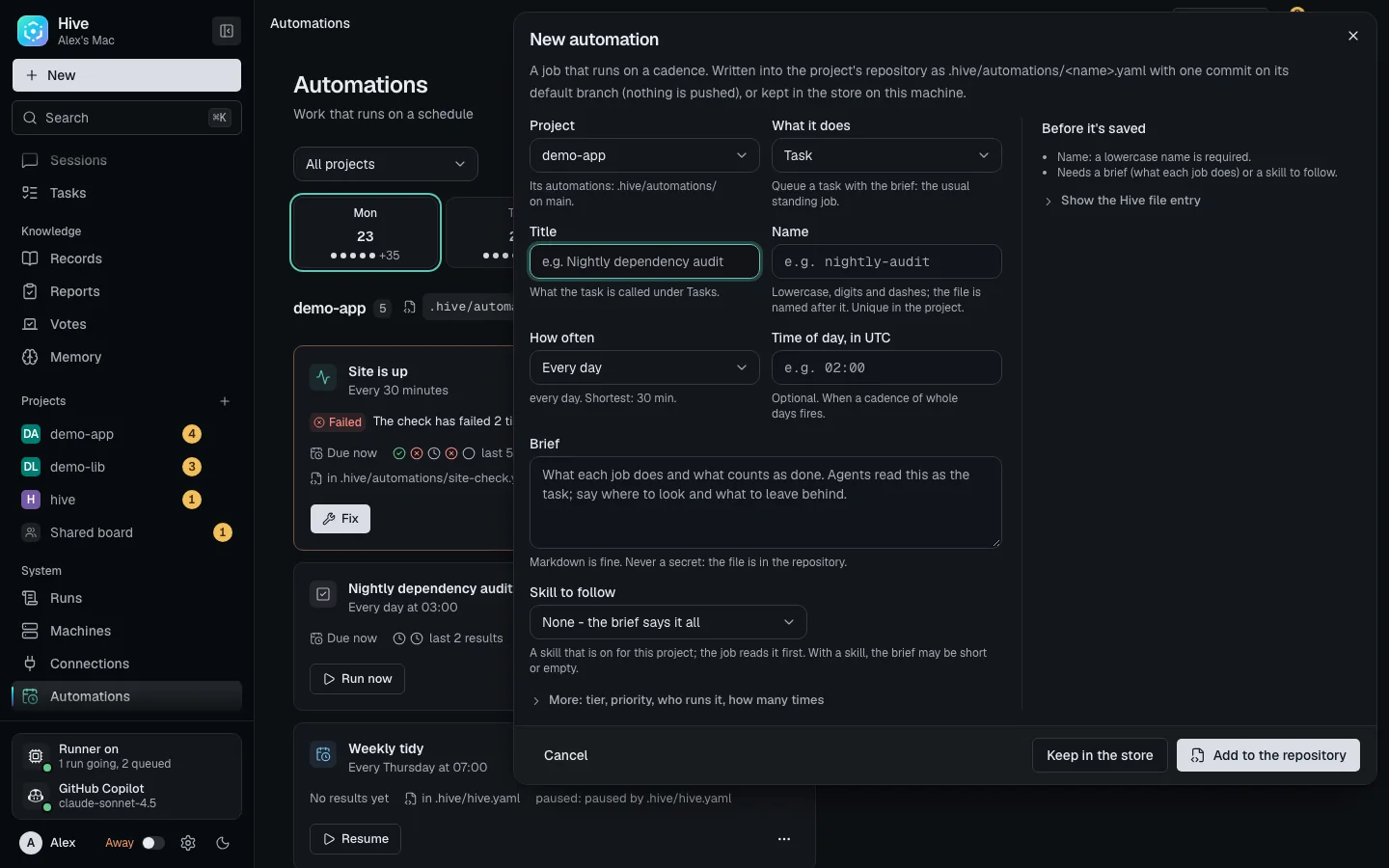
When the panel Before it's saved says Passes every check., choose
Keep in the store: the schedule lives in the store, Hive's own database
on this machine (~/.hive/hive.sqlite). Add to the repository keeps it
as a file in your project instead (step 6). Or, from a terminal:
hive schedule add --project my-app --title "Weekly dependency review" \
  --every 1w --at 09:00 \
  --brief "Update the patch and minor versions, run npm test, and list the major ones for me."
SCHED-001 set in my-app: Weekly dependency review every 1w, first at 2026-11-23T09:00:00Z
--every takes a number and a unit (30m, 6h, 1d, 2w) or one of
hourly, daily and weekly. --at HH:MM is a time of day in UTC and
needs a cadence of whole days. With --at, the first run comes at the next
09:00 UTC. Without it, the first run comes one cadence from now.
3. Add a check script
A check is a script in your repository that exits 0 while all is well. In
your checkout, save this one as .hive/automations/site-up.sh, with your
site's address in it:
#!/bin/sh
# A check: exit 0 when the site answers, anything else when it does not.
exec curl --fail --silent --show-error --max-time 20 --output /dev/null \
  https://my-app.example.com/
Hive refuses a script that lies outside the project's .hive/ folder, and
one that is not committed on the default branch (main here). So commit it
there, then add the schedule:
cd ~/code/my-app
chmod +x .hive/automations/site-up.sh
git add .hive/automations/site-up.sh
git commit -m "Add the site-up check"
hive schedule add --project my-app --kind check --title "Site is up" \
  --script .hive/automations/site-up.sh --every 30m
Hive answers with the id of the new schedule, SCHED-002, and the time of
its first run. 30m is the shortest cadence it accepts until you lower the
setting schedule.min_minutes (30 by default, never under 5), for example
with hive settings set schedule.min_minutes 10.
In the console, the same form adds a check: under What it does pick
Check (script), name the script in Script, and choose under Then
queue the kind of job a failed run queues. A watch is added the same way,
with --kind watch or Watch (script).
4. See what a run does
On each of its passes the runner looks for schedules that are due. For a standing job it queues one job with your brief, and an agent takes it like any other job. For a check or a watch it runs the script itself, in a fresh worktree of the latest commit on the default branch, and acts on the result:
| The script | What the runner does |
|---|---|
| A check exits 0 | Nothing. If the check was red before, it posts on the board that it is green again. |
A check exits with anything else, or runs past schedule.script_timeout_minutes (20 minutes) |
The check is red. The runner queues one job to make it pass, with the exit code and the end of the output in its brief. The first red run also posts a finding on the board. |
| A watch exits 0 and prints nothing | Nothing. If the watcher was broken before, it posts on the board that it works again. |
| A watch exits 0 and prints something | Queues one job with what it printed in the brief. |
| A watch exits with anything else | The watcher itself is broken. The first failure posts a finding on the board. After three failures in a row the runner queues one job to fix the script. |
The board is where a project's agents post what they find. One job per schedule is open at a time: while the job from an earlier run is still open, a new run queues nothing. A check that stays red while that job is open makes one job, not one for every run.
Automations shows the next seven days at the top and a card for each schedule: its cadence in your own time zone, the next run, the last results and where it is kept (set by you, or the file's path). History, in the card's More menu, lists each run with its exit code, the last output and the jobs it queued. In a terminal:
hive schedule list --project my-app   # status, state, cadence, next time (UTC), runs
hive schedule show SCHED-002          # one schedule, its brief and the jobs it queued
hive schedule log SCHED-002           # the last output of a check or watch script
5. Pause, run now or end
On a card, Run now makes the schedule due at once. The More menu has Pause and End it, and a paused card shows Resume. In a terminal:
hive schedule pause SCHED-001 --note "release week"   # stays in the list, does not fire
hive schedule resume SCHED-001                        # a time missed while paused fires once
hive schedule run SCHED-002                           # due now, on the runner's next pass
SCHED-001 paused
SCHED-001 active, next at 2026-11-23T09:00:00Z
SCHED-002 due now; the daemon runs `.hive/automations/site-up.sh` on the next tick
The program's messages say daemon for the runner. hive schedule end
stops a schedule for good: it stays in the list as ended. Step 6 uses it.
6. Keep a schedule in the repository
A schedule in the store exists on this machine only. A file under
.hive/automations/ is reviewed and versioned with the code.
In the console, open the More menu of a schedule you set by hand and choose Move into the repository. Show the Hive file entry previews the file. The button Move into the repository commits it on the default branch and ends the schedule you set by hand. Nothing is pushed: the commit goes out with your next push.
Or write the file yourself. Its name is the schedule's name:
# .hive/automations/weekly-dependency-review.yaml
title: Weekly dependency review
every: 1w
at: "09:00"
brief: |
  Update the patch and minor versions, run npm test, and list the
  major ones for me.
The fields follow the flags of hive schedule add (hive help manifest
lists them). A check adds kind: check and script: with the script's
path. Check the file, commit it, apply it, and end the schedule it replaces:
hive manifest check --project my-app     # in ~/code/my-app, before the commit
git add .hive/automations/weekly-dependency-review.yaml
git commit -m "Keep the dependency review in the repository"
hive manifest sync --project my-app      # now, instead of at the runner's next pass
hive schedule end SCHED-001 --note "moved to the repository"
.hive/automations/weekly-dependency-review.yaml: sound; 1 schedule
manifest my-app: 1 file in .hive/automations/ at 281889e3a098; schedules: 1 added
SCHED-001 ended
The runner reads the committed default branch of your checkout, never the
working copy or another branch, and applies the files again when a commit
changes them. From then on the file is the schedule: edit it and commit to
change it, add paused: true to pause it, delete it to end it. A
hive schedule end lasts only until the files are next applied. The older
.hive/hive.yaml, with a schedules: list, is still read.
7. Check the caps
One setting counts every job, and four bound schedules:
jobs_per_day(2 by default): the jobs Hive may start in one UTC day, on all machines together. Once the number is reached, a job from a schedule waits until midnight UTC. Jobs for your own tasks count too, but they still start. A script run is not a job and does not count.schedule.min_minutes(30): the shortest cadence.schedule.max_per_project(10): the active and paused schedules per project.schedule.script_timeout_minutes(20): how long a script may run.schedule.scripts_per_tick(2): the scripts the runner runs in one pass. While the machine is saturated it runs none.
hive status                          # "runs today 0 of 2 (jobs_per_day)" is today's count
hive settings set jobs_per_day 10    # 0 lifts the cap
In the console: Settings, Limits, Runs per day (all machines together).
Check that it worked
In the console, Automations shows a card for each schedule under
my-app, with the badge Active and when it runs next. In a terminal,
hive schedule list --project my-app shows them as active with a time
under NEXT, and hive manifest show --project my-app lists the ones the
repository keeps. After the check's first run, its STATE is green and
hive schedule log SCHED-002 prints its exit code and output.
When something goes wrong
- A schedule never fires. The runner queues the jobs and runs the
scripts, so nothing happens while it is off or paused. Home then says
Runner is off or Runner is paused: nothing new starts, with the
button that fixes it. In a terminal,
hive statushas adaemonline that starts withalivewhile the runner runs. The runner also tends active projects only (hive projects), andNEXTand--atare in UTC. - A job is queued but does not start.
jobs_per_daymay be reached: see theruns todayline ofhive status. Raise it, or wait for midnight UTC. 10m is shorter than the 30m floor. The cadence is underschedule.min_minutes. Lower the setting (step 3) or lengthen the cadence.- Hive refuses the script.
No file ".hive/automations/site-up.sh" on main of my-appmeans the script is not committed on the default branch.The script "check.sh" is outside .hive/means it has to move under.hive/. Fix it, commit, and add the schedule again. - The script is not executable. The runner then runs it with
sh, whatever its first line says. A script for another interpreter needschmod +xand a commit. hive manifest checkexits 1. It lists each problem, for exampleunknown field `cadence`, expected one of name, title, every, at, kind, brief, skill, script, job_kind, tier, priority, run_as, times, paused. A file with a problem is held: its schedule stays as it was, and the other files still apply.hive manifest show --project my-applists the problems. A runner that applies the commit itself also posts them as a finding on the For you page.
Read more
- Standing jobs: the reference for
hive schedule. Every flag: hive schedule. Its settings: schedule. - Watchers and monitors: how a script runs, with two worked scripts.
- The project's own files: every field of an automation file.
- Automations: the page in full.
- Review and merge the work: where the commits of a scheduled job arrive.
- Seat role leads on a project: an agent that looks after one concern on a cadence.
- Troubleshooting: when the runner is off or a job fails.