Give a task and steer it
On this page
Write a task an agent can act on, follow the work, answer the lead's questions, change or cancel the task, and rule on work the agents suggest.
Before you start
- A project is registered, a model provider is connected and the runner is on (Set up your first project).
- The console is open at
http://127.0.0.1:8765.
1. Write the task
A task is what you ask for: a title, a brief and a priority.
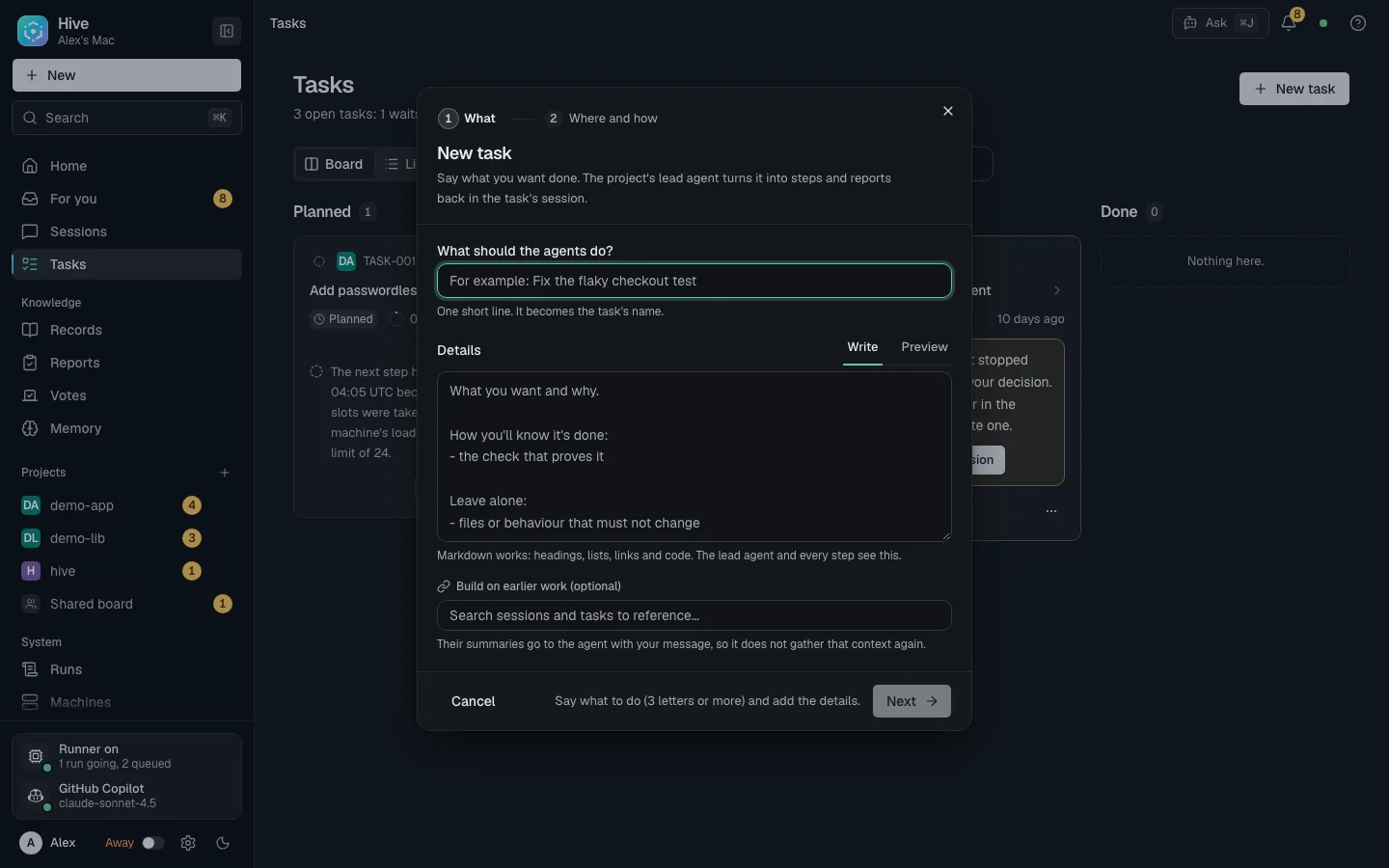
- Open Tasks in the sidebar and press New task.
- Under What should the agents do?, write one short line. It becomes the task's name.
- Under Details, write the brief. Markdown works, and Preview shows it.
- Press Next. Pick the Project. Under How urgent is it?, choose Low, Normal, High or Urgent.
- Press Create.
The console says
Task given. The my-app lead agent is starting on it now and replies in its chat.
and opens the task. From a terminal, with the brief in a file:
hive task new --project my-app --title 'Rate-limit the public API' \
  --brief-file brief.md --priority 30
It answers TASK-001 created in my-app: Rate-limit the public API. The
brief can also be text (--brief '...') or come from stdin
(< brief.md). --priority is a number, and a higher one is more urgent: the
console's Low, Normal, High and Urgent are 0, 10, 30 and
50. The console starts at Normal, the command at 0.
A brief an agent can act on
The lead plans from the brief and writes each job's instructions from it,
so the agents know of your intent only what you wrote. Say what you want
and why. Say how you will know it is done, as a check an agent can run.
Say what to leave alone. For example, brief.md:
Limit each API key to 600 requests a minute on the public API (`/v1/*`).
One client's runaway script slowed the API for everyone last week.

Done when:
- a key over the limit gets HTTP 429 with a `Retry-After` header;
- `npm test` passes, with a new test that proves the limit.

Leave alone:
- the admin API under `/admin`;
- the format of every existing response.
2. Know what happens next
Your write wakes the runner: it does not wait for its next planning pass.
The project's lead (my-app-lead, the agent that owns the project)
reads the task and cuts it into jobs, which the console calls steps.
Each job is one agent's run in a throwaway clone of the project, within
the budgets you set (Choose models and set budgets). When
every job is done, their branches become one pull request on the project's
upstream (Review and merge the work).
| The program says | The console says | What it means |
|---|---|---|
open |
Open | You gave it. The lead has not planned it yet. |
planned |
Planned | The lead cut it into jobs. |
in_progress |
In progress | A job has started. |
review |
Asked you | The lead stopped and waits for your answer. |
done |
Done | Its pull request was merged, or you closed it. |
cancelled |
Cancelled | Cancelled before it was done. |
A task moves down this list, or to cancelled. From review it goes
back to in_progress when you answer. On the Tasks page, the
Board view has the columns Planned (open tasks sit here too),
In progress, Asked you and Done.
The lead is told to give a task's jobs the task's priority, and among jobs the runner ranks alike otherwise a higher priority runs first. Before priority comes whose work it is. The owner's work (the lead's runs, answers, the jobs planned from tasks, pull-request reviews and security updates) goes ahead of the agents' own. While it waits, the runner keeps one slot on this machine for it alone, also when the machine is loaded.
While a job from a task is queued in a project, the agents' own jobs that change code there stay in the queue. When that project already runs as many jobs as it may, the runner asks the youngest of the agents' runs there to hold after its current step and carry on later; it asks none of the owner's. To move waiting work up later, write on the task again: the runner raises the task's queued jobs to priority 80, once per message.
3. Follow the work
Open the task from Tasks. It opens on the Sessions page as one conversation: your brief and messages, the lead's replies, and every run as it happens, with the commands it ran and the files it edited. Under your latest message, one line says where it stands, from Sent to Seen by my-app-lead.
Beside the conversation, Steps lists the jobs the lead planned, each with its state (Waiting, Working, Done, Failed). A step that has run opens that run on the Runs page. Brief holds what you asked, the task's details and, once you changed it, its History.
From a terminal, hive task list --project my-app lists the tasks with
their status. hive task show TASK-001 prints one task: the brief, its
versions under REVISIONS, the conversation under MESSAGES and the lead's
jobs under JOBS.
4. Answer the lead
The lead asks its questions in the task's conversation. When it cannot go
on without your decision, it is told to say why there and stop the task:
the status becomes review, Asked you in the console. On Tasks, the
card moves to the column Asked you and gets the button Open the session.
The lead's message carries its answers as buttons. Press one, or write your own answer in the box and press Enter. Either way a stopped task goes back to In progress and the lead takes it from there. An answer can also close the task (Good enough, close it) or open the brief for a change (Change what I asked).
From a terminal, hive task show TASK-001 prints the question and its
answers, and hive task reply sends yours:
MESSAGES
  2026-11-23T04:28:34Z MSG-20261123T042834Z-1 my-app-lead: Count per API key or per IP address?
    [1] Per key, and refuse anonymous calls
    [2] Per key, and per IP for anonymous calls
    [3] Change what I asked  (amend)
hive task reply TASK-001 'Per key, and refuse anonymous calls'
The numbered answers are offers, not a menu: hive task reply sends
whatever you write, and any reply of yours ends the review. To close the
task instead, run hive task status TASK-001 done. Close a task only when
you want nothing more from it: the runner opens no pull request for a
done task, so finished work that has none yet is not delivered. The flag
--choice is how the lead offers its answers. You do not need it.
5. Write to the lead outside a task
Open the project and its Work tab. Under Sessions, the selector reads Whole project. Write in the box and press Enter. To write about one task, pick it in the selector.
hive msg send --project my-app 'Which task do you plan to start next, and why?'
hive msg list --project my-app            # every message; --unread for the new ones
hive msg read MSG-20261123T042834Z-1      # mark one as read
A message of yours wakes the runner, and the lead reads it in its next
run. Add --task TASK-001 to send or list the messages of one task.
6. Change or cancel the task
Both moves are on the task's card on Tasks, under More actions: Edit the task and Cancel the task. In the open task, click its title to edit it, or press Cancel.
To change the task, edit the name or the Details, say why under What changed, and why?, then press Save the changes and Yes, save them. To cancel it, answer Why are you cancelling it? and press Cancel the task. From a terminal, with a second task to cancel:
hive task amend TASK-001 --brief-file brief.md \
  --note 'Halve the limit: 300 a minute, the gateway allows no more.'
hive task cancel TASK-002 --reason 'The changelog moves to the docs site instead.'
They answer TASK-001 amended: rev 2 and TASK-002 cancelled. What each
does to the work:
- A change is kept as a new version: REVISIONS in
hive task show, History on the task's Brief tab. A task the lead has not planned yet is planned from the new version. A job that has not started gets a line in its brief that tells its agent to read the task again. A job that is already running keeps the brief it started with, and nothing tells it of the change. So when the change matters to work that is planned or running, say it in the task's conversation as well. - A cancel is final: to take the work up again, give a new task. The
task's jobs that have not started are cancelled with it. A job that is
already running is not stopped. To stop it now, open its run from
Steps and press Cancel run, or run
hive harness cancel IDwith the run's id (hive harness sessions --project my-applists the runs).
Hive refuses to amend a task that is done or cancelled, and the runner
opens no new pull request for it.
7. Rule on suggested work
Agents propose work too. A suggestion is written like a task, and a different agent reviews it before it becomes one. The reviewer accepts it (it is a task from then on), declines it, or hands it to you.
- Those handed to you wait on For you under Suggested work, each with Accept and Decline. Accept opens Make it a task?, where you can sharpen the name and set the urgency. Accept, make it a task creates the task.
- The open suggestions of a project are on its Work tab under Suggested next, each with where its review stands. Suggest work adds one of your own, and an agent reviews it the same way.
hive task suggestions --project my-app --status owner   # the ones handed to you
hive task show SUG-002                                  # the why, and the reviewer's reason
hive task review SUG-002 decline --reason 'Two partners still call /v0.'
hive task review SUG-001 accept --reason 'the build broke on it twice'
The last one answers SUG-001 accepted: TASK-003 created in my-app. You
may rule on any open suggestion without waiting for its reviewer.
Check that it worked
- On Tasks, the task sits in the column of its status, and its conversation holds the lead's reply.
hive task list --project my-appshows the task with its status, andhive task show TASK-001the lead's reply and the jobs it planned.
When something goes wrong
- Your message says Sent · nobody has picked it up yet. Two minutes passed and no run of the lead took it. Most often the runner is off or paused, or no model provider is connected. Home says which (Set up your first project, Troubleshooting).
- A command prints
A project is needed.hive task newneeds--project, and so doeshive msg sendwithout--task.hive projectslists the names. - The lead writes
I stopped TASK-001. After three failed jobs, or fewer when the lead finds nothing else to try, the runner stops the task for you, with the answers Try again another way, Good enough, close it and Change what I asked. Pick one, or write what you want instead. - A suggestion gets no verdict. Its review is the agents' own work.
Once
jobs_per_dayjobs (2, yours included) have run in a UTC day, the runner starts only your own work until midnight UTC. Raise the number under Settings, Limits, Runs per day (all machines together).
Read more
- Tasks in the console: the conversation and the delivery line in full.
- Suggested work: the review job and the verdicts.
- The express lane for the owner's work: how your work gets a slot.
- Answer what waits for you: the rest of your round.